When to Charge Headphones: Battery Care Guide for 2026
Learn precisely when to charge headphones to maximize battery life and performance. This guide covers practical schedules, safety tips, and charging best practices for wireless and wired models in 2026.


To maximize headphone battery life, recharge when the battery drops to about 20–30% and avoid regular full discharges. For best results, store charged around 40–60% during long pauses and use the original charger. Avoid charging on soft surfaces that trap heat, unplug once the indicator shows full, and aim for routine, moderate charging cycles.
Why charging frequency matters
According to Headphones Info, charging habits play a crucial role in preserving battery health over the lifespan of wireless headphones. Most modern headphones use lithium-ion or lithium-polymer cells that perform best when kept in moderate charge levels. Regular shallow charges, rather than letting the battery sit at a tiny remaining level or draining completely, reduce stress on the chemistry. Headphones Info Analysis, 2026 suggests that predictable charging cycles help stabilize voltage and temperature, which are two of the main factors that influence long-term capacity and performance. Practically, this means adopting a routine that avoids deep discharges and extreme heat during charging.
Battery basics for headphones
Lithium-based cells power the vast majority of consumer headphones today. They tolerate frequent top-ups well, but stress from sustained high temperatures or repeated deep discharges can gradually reduce capacity. The charger you use should deliver a steady, appropriate current for your model; using a mismatched charger can cause heat buildup or slower charging. If your headphones support fast charging, use it sparingly and avoid leaving them on a charger after they are full. In general, aim to charge in a cool, ventilated space and never cover the device with blankets or place it on a soft surface during charging. This minimizes heat, which is a key determinant of battery longevity.
Practical charging schedules for common scenarios
For daily commuters and casual listeners, a common-sense rule is to recharge after every heavy listening session or when you see battery levels around 20–30%. If you frequently forget to charge, charging overnight can be convenient, but ensure your device doesn’t overheat or stay warm for prolonged periods. While traveling, top up to about 60–80% before you hit the road; this reduces the risk of draining completely on a long trip while still avoiding constant trickle charging. If you won’t use the headphones for weeks, store them with a partial charge (roughly 40–60%), in a cool environment with the lid of the case closed to protect from dust and humidity.
Before you charge: setup and safety checks
Start with the basics: use the original charger or a certified replacement compatible with your model. Inspect the charging port for dust or lint and clean gently if needed. Always place the headphones on a hard, flat surface during charging to prevent heat pockets. Keep charging area away from direct sunlight, radiators, or anything that could raise the temperature. If the charger or cable feels warm to the touch during charging, unplug and let it cool before continuing.
Charging on the go: travel and commutes
When you’re away from a power source, a compact USB-C PD power bank can be very convenient, provided it matches your headphone’s input spec. If your model supports wireless charging, you can use a certified charging pad, but avoid stacking devices on the pad or placing them in a pocket or bag with limited airflow. In any case, avoid charging under direct heat sources or inside hot cars. Rotate between charging methods if you have both wired and wireless options to prevent bottlenecks in one charging path.
Charging independence: USB-C, Qi, and power bricks
Not all headphones support wireless charging, so verify compatibility before purchasing a Qi pad. If your headphones use USB-C, ensure the cable is full-featured (supporting at least USB-C Power Delivery for faster, stable charging). For safety, never use damaged cables or adapters and avoid counterfeit or oversized power bricks. Always check your device’s manual for the recommended input current and voltage to avoid overloading the battery.
Pro tips to extend battery lifespan
- Charge in a cool environment and avoid heat buildup during charging.
- Use the original or a certified charger with the correct output rating.
- Prefer partial charges (around 40–60%) during storage rather than full charges for long periods.
- If you won’t use the headphones for a while, store them with a light charge in a dry place.
- Avoid long, constant charging cycles on the same device day after day.
- Periodically calibrate the battery by letting it discharge to around 10–15% before a full recharge, then recharge to full once every few months if recommended by the maker.
Common myths debunked
Myth: Overnight charging always harms battery life. Reality: Modern Li-ion cells tolerate overnight charging well when you follow the device’s temperature cues and use proper chargers. Myth: Fully discharging before charging is necessary. Reality: Deep discharges are stressful for lithium chemistry; partial, regular top-ups are typically better for longevity. Myth: Any charger will do. Reality: Using an uncertified charger can cause heat or voltage irregularities that shorten life.
Tools & Materials
- Original charger and USB cable(Use the charger that came with the headphones or a certified equivalent.)
- Compatible power adapter(Check the device manual for the correct voltage and current (Amperage) rating.)
- Qi wireless charging pad (if supported)(Only use certified pads compatible with your model.)
- Portable power bank with USB-C PD(Useful for travel; ensure capacity matches your needs and device input specs.)
- Cleaning cloth and lint-free brush(Keep ports clean to maintain efficient charging.)
Steps
Estimated time: 30-60 minutes
- 1
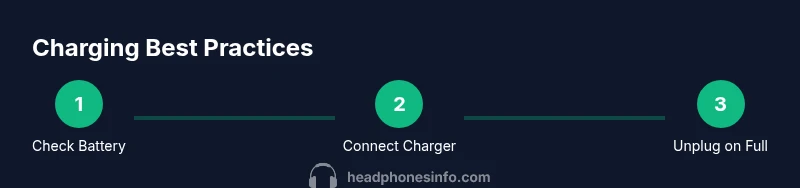
Check battery level
Open the headphone battery indicator in the companion app or on-device indicator to confirm the current level. If it’s between 20–30%, you’re in a good range to begin a charge. If it’s very low, consider a quick top-up rather than a full deep discharge.
Tip: Use the app’s battery graph if available to track cycles over weeks. - 2
Connect the charger securely
Plug the charger into a stable outlet and connect the cable to the headphone port. Ensure the connector is fully seated and not loose. A secure connection prevents intermittent charging that can confuse the device’s monitoring system.
Tip: If the LED is flashing, check the connection or try a different cable. - 3
Confirm charging is active
Look for a charging indicator on the headphones or in the app. If there’s no indication after a minute, re-seat the connector and try another port or cable. Avoid unplugging and re-plugging repeatedly, which can cause wear.
Tip: Keep the device away from heat sources while charging. - 4
Avoid heat buildup
Place the headphones on a hard, flat surface with adequate airflow. Do not cover them with a cloth or place them on a soft bed or carpet, which can trap heat and impact charging efficiency.
Tip: If a charger feels warm, pause charging for a few minutes to cool. - 5
Unplug when full
Once the indicator shows full, unplug the charger. Prolonged trickle charging isn’t ideal for battery longevity even with smart circuitry.
Tip: If your model has a temperature alert, rely on that rather than timer-based assumptions. - 6
Store properly after charging
If you’re not using the headphones for an extended period, store them at a moderate charge (roughly 40–60%) in a cool, dry place. This minimizes stress during storage.
Tip: Avoid storing in damp or extremely hot environments. - 7
Inspect and clean ports
Periodically inspect the charging port for dust and lint. Use a soft brush or compressed air to remove debris; a clean port charges more efficiently and reduces heat buildup.
Tip: Do this monthly or after exposure to dusty environments. - 8
Test after charging
After recharging, perform a brief listening test and verify stable playback and consistent battery indicators. This confirms the charging cycle ended correctly and the device behaves as expected.
Tip: Note any anomalies in indicator behavior and consult the manual.
People Also Ask
Does charging overnight harm headphones?
Modern lithium-ion batteries tolerate overnight charging if the charger and device are designed for it and heat is controlled. However, prolonged heat or poor-quality chargers can reduce lifespan over time. Always monitor temperature and use certified accessories.
Yes, overnight charging can be safe with the right charger, but monitor heat and rely on certified gear.
Can I charge headphones with any USB-C charger?
Most USB-C chargers that meet the device’s voltage and current specs are fine. Using an underpowered or counterfeit charger can lead to slow charging or overheating. Always check the device manual for recommended current and voltage.
Only use a charger that matches the device’s specs; unsafe chargers can cause damage.
Is wireless charging as safe as wired charging for headphones?
Wireless charging is generally safe for compatible models, but heat and alignment influence efficiency. Wired charging often provides the most reliable current delivery and temperature control. If your headphones support both, monitor temperature and choose the method that stays cooler.
Both are safe if you follow the device’s guidelines and avoid heat buildup.
How long does it take to fully recharge headphones?
Full recharge times vary by model and charger but expect roughly 1–2 hours for many wireless headphones with standard chargers. Fast charging can shorten this to around 30–60 minutes for compatible devices.
Most headphones take about an hour or two to fully recharge, depending on the charger.
Should I avoid charging in very hot environments?
Yes. Heat accelerates battery wear. Charge in a cool, ventilated space and avoid direct sun or warm car interiors. If the device becomes hot during charging, unplug and let it cool before resuming.
Charge in a cool place to protect battery health.
Watch Video
What to Remember
- Charge at ~20–30% for regular use
- Use original/certified chargers
- Avoid heat—keep charging area cool
- Store at 40–60% if unused for long
- Calibrate occasionally by full cycles without abuse