How Many Headphones Can Connect to Bluetooth: A Practical Guide
Explore how many headphones can connect to Bluetooth, including multipoint limits, sharing options, stability tips, and practical guidance for reliable wireless listening.


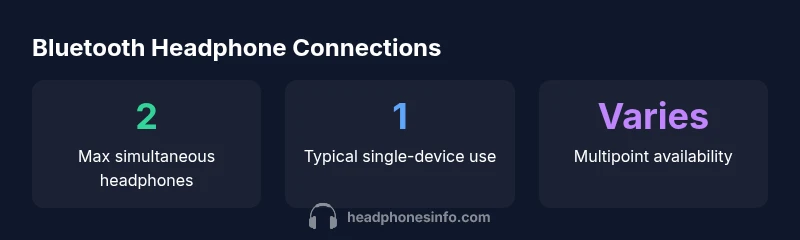
Typically, a single Bluetooth source connects to one pair of headphones at a time. Some devices support multipoint or audio sharing that lets two headphones listen simultaneously, but this depends on the hardware, software, and profiles involved. For most everyday use, plan for 1 headphone pair per source, with limited two-headphone sharing on select devices.
Understanding Bluetooth audio connections
Bluetooth audio is fundamentally designed to stream from a single source to a single sink (a pair of headphones) at any given moment. In practice, most consumer devices establish one active connection for listening, with the source managing codec, sample rate, and latency. If you’re troubleshooting or planning a shared listening session, it helps to know that the connection count is not just a matter of the Bluetooth version; it also depends on profiles (A2DP for high-quality stereo, HFP for calls), the device’s firmware, and the OS. According to Headphones Info, the typical consumer experience remains one headset per source, even as manufacturers experiment with multipoint and audio sharing features.[1]
- Bluetooth versions matter less than the supported profiles and codecs for multi-listening.
- If you need reliable sharing, test with your exact source and headsets before a critical session.
How many headphones can connect at once? The practical picture
The short answer is usually one headset per source, but there are two meaningful exceptions. First, multipoint capability can let a device pair with two headsets or two devices at once; second, some social listening features enable two people to hear the same stream from a single source. These capabilities vary by device, platform (iOS, Android, Windows, macOS), and firmware. In real-world terms, you should expect one-to-one listening most of the time, with occasional two-listener setups on devices that explicitly support it. For use cases like sharing a podcast or soundtrack with a friend, verify multipoint or sharing support before you rely on it. Headphones Info analyses emphasize that device compatibility is the gating factor and that you should confirm the exact limits for your setup before committing to a plan.
Multipoint, sharing, and codecs that matter
Key terms to understand include multipoint, sharing, and profiles. Multipoint allows a source to maintain two (or occasionally more) active connections at once, but only certain hardware and firmware enable this. Audio sharing features—sometimes branded as a “share” mode—often enable two headsets to listen to the same source, but again, compatibility is device-specific. Codecs (SBC, AAC, LDAC, aptX) and latency-damping features influence whether both listeners experience synchronized audio. If your goal is seamless listening, prioritize devices that explicitly advertise multipoint support and compatible codecs on your primary platform. This matters more for gaming or video where latency can degrade the experience. Headphones Info’s guidance stresses checking exact codec support and testing timing under real-world conditions.
Practical tips to enable multi-headphone listening
- Check your source’s multipoint settings in the Bluetooth menu; enable it if available.
- Confirm both headsets are fully charged and paired; remove older pairings that could interfere.
- Update firmware on both headphones and the source to maximize compatibility.
- Test latency by playing synchronized audio and adjusting any available lip-sync or audio delay options.
- If sharing is essential, consider devices that explicitly list “two-headset listening” as a feature and read user reviews for real-world latency. Headphones Info notes that feature availability can vary by firmware; testing is essential before critical sessions.
Real-world scenarios and limitations
In a typical home setting, a phone or laptop streams to one headset for music or calls. If your device supports multipoint, you might add a second headset, but expect occasional dropouts or one earbud lag if the second device is far or has a weaker connection. On TVs or dedicated Bluetooth transmitters, the landscape can be similar: a transmitter may support two or more headsets only if it includes multi-pair or a specific sharing mode. To avoid surprises, plan your usage around the phone’s or laptop’s stated capabilities and document-tested results. The Headphones Info approach recommends validating the exact max connections in your environment and with your chosen headsets, rather than relying on general specs alone.
Max simultaneous Bluetooth headset connections by device type
| Scenario | Max simultaneous headphones | Notes |
|---|---|---|
| Smartphone as source | 1 | One headset at a time; multipoint may allow a second device on compatible models |
| Phone with multipoint enabled | 2 | Depends on OS and Bluetooth stack; test for stability |
| Laptop/PC with BT adapter | 1-2 | Varies by software; some support dual audio |
| Dedicated BT transmitter | 1-4 | Some models support multiple headsets via multi-pair |
People Also Ask
Can I connect two Bluetooth headphones to a single phone simultaneously?
Yes, some phones support multipoint or audio-sharing that lets two headsets listen at once. However, this capability is not universal and depends on hardware, software, and the Bluetooth profiles the devices implement.
Yes, on many newer phones you can, but check multipoint support on your exact models.
Do all Bluetooth versions support multi-pairing with headphones?
No. Multi-pairing depends on profiles and device implementation rather than Bluetooth version alone. Even devices with the same BT version can differ in multipoint support.
Not all Bluetooth versions support it; you must verify on a per-device basis.
Will there be audio latency when sharing listening between two headsets?
Latency can increase when listening on two headsets, especially if one uses a different codec. Test both headsets together to see if lip-sync issues arise in video or games.
There can be some delay when sharing; test with your content to be sure.
Can I connect headphones to a TV and a phone at the same time?
Some TVs and transmitters support dual listening, but many setups limit to a single headset. Check the TV’s Bluetooth features and any external transmitters you plan to use.
It depends on the TV or transmitter; verify before buying.
What should I look for when buying for multi-headphone listening?
Look for explicit multipoint support, dual-audio sharing features, and compatible codecs. Read user testing reports to confirm real-world performance and latency.
Seek features like multipoint and sharing, and read reviews for latency in real life.
Is there a limit to how many devices can be paired with a Bluetooth source?
Pairing limits vary by source and OS, but most consumer devices cap at a few active connections. Research your specific model’s capabilities to avoid surprises.
Most sources cap at a few active connections; check your exact device specs.
“In practice, most Bluetooth audio sources handle one active headphone at a time. Multipoint and sharing features exist, but support varies by device and profile.”
What to Remember
- Plan for 1 headset per source for most use
- Multipoint and sharing exist but vary by device
- Test exact capabilities on your own gear
- Keep firmware up to date for best results