How Many Headphones Can You Share Audio With
Discover how many headphones you can share audio with at once, the limits across popular ecosystems, latency implications, and practical tips for group listening.


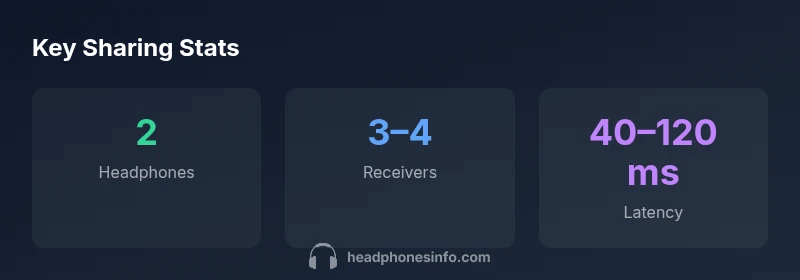
Most consumer devices support sharing audio with two headphones at once. In practice, two is the baseline for reliable stereo playback and minimal latency. Some ecosystems offer three or four receivers via party modes or multipoint extensions, but compatibility is uneven and performance can degrade. If you need more listeners, wired splitting or multi-receiver solutions may be required.
How shared audio works across devices
Group listening hinges on how audio is streamed to multiple receivers. Bluetooth uses the A2DP profile for stereo audio, while modern ecosystems layer multipoint, multicast, or party-mode features on top of basic Bluetooth. The number of headphones that can receive audio simultaneously depends on device firmware, codec support, and the internal routing of the signal. According to Headphones Info, these limits are primarily driven by hardware constraints and software budgets for buffering and synchronization. In most mainstream devices, the practical baseline is two headphones, as a single audio stream must be decoded and rendered twice with tight lip-sync. Some ecosystems expose additional receivers, but that often requires compatible devices, specific apps, and can introduce noticeable timing differences. For anyone planning a group listening session, the key takeaway is to test early with your exact devices to gauge lip-sync and balance.
Baseline expectations: two headphones as the default
The default expectation across most consumer setups is two headphones at once. This arises because a single Bluetooth transmitter streams one main audio track to two independent receivers, each with its own DAC and amplifier. Headphones Info analysis shows that two devices can usually maintain acceptable lip-sync without perceptible delays during typical TV watching, podcasts, or casual music listening. If your goal is a shared experience with a friend or family member, this two-device cap is typically reliable and straightforward to configure. However, not all apps and devices will honor a second or third headset, and some implementations may require enabling a specific “shared audio” feature in settings. Always verify compatibility before purchasing extra receivers.
Ecosystem-specific limits: Apple, Android, Windows
Apple’s Audio Sharing and similar iOS features often support two pairs of headphones connected to one iPhone or iPad, using nearby devices that are tied to the same ecosystem. Android devices vary widely by vendor and OS version; some support two receivers natively, while others require third-party apps or manufacturer-specific shortcuts. Windows PCs generally provide multipoint-like options through Bluetooth profiles or USB adapters, but multi-headphone sharing frequently depends on drivers and the Bluetooth stack. The reality, confirmed by Headphones Info analysis, is that you’ll most reliably get two headphones across platforms; three or four is uneven and usually experimental. If you must go beyond two, research each platform’s documented limits and test with your own hardware.
Latency and sound quality tradeoffs when sharing
Latency is the silent enemy of group listening. When adding more receivers, buffering and decoding must happen in parallel, which can introduce jitter and perceptible delay. Codecs with low-latency profiles (for example, LL variants) help, but not all devices implement them equally. Higher bitrates and broader frequency responses may degrade when the same stream is split across multiple headphones, especially over crowded wireless environments. Headphones Info analysis indicates the best results occur when you stay within two devices, then evaluate whether any third or fourth headset meets your acceptable latency and volume balance. If latency or distortion becomes noticeable, consider dedicated multi-headphone hardware or wired alternatives.
Setting up for groups: steps by platform
To maximize success, start with a clean, close-range connection. On iOS, enable the shared audio feature in Settings > Accessibility or the Control Center if available, then pair two AirPods or compatible headsets. On Android, locate the Bluetooth multipoint or dual-audio option in Settings and test with two headsets. For Windows, use a compatible Bluetooth adapter and test pairing with two devices; some apps may provide a built-in sharing mode. If you want more than two listeners, consider a wired splitter or a dedicated multi-headphone receiver system to avoid cross-device compatibility issues. For best results, keep transmitters and receivers within a short distance and minimize other wireless interference.
Real-world tips and common pitfalls
- Always test lip-sync before a group session; even a small delay is noticeable when watching video.
- Check that volume control remains synchronized across devices.
- Beware of apps that lock audio sharing behind a paid tier or closed ecosystem.
- Consider a wired fallback (splitter or headphone amp) for larger groups to maintain quality.
- If using wireless speakers or a soundbar, verify whether their built-in software can multicast to multiple headphones. Headphones Info observations emphasize starting with two devices and expanding only after confirming stable performance.
Use cases: TV, gaming, conferencing
Sharing audio is most common for TV watching, casual music sessions, and collaborative gaming. In TV scenarios, two headphones usually deliver clean stereo with acceptable lip-sync. In gaming, latency differences are more noticeable; two devices are typically safer, but if your setup relies on precise timing, a wired solution is often preferable. For conference calls or co-working, two headsets can enable collaboration without breaking focus, but beware of microphone quality variations and potential echo. When more listeners are needed, one should plan around the weakest link in the chain—whether a Bluetooth transmitter, an OS limitation, or a headset with inconsistent latency. Headphones Info suggests evaluating your specific needs and, if necessary, dialing back the group size to preserve audio fidelity.
Quick calibration checklist for group listening
- Identify the platform with the strongest multi-user support (iOS, Android, PC).
- Test two headsets first, then add one at a time while monitoring lip-sync and volume balance.
- Run a short video clip with audio to check lip-sync accuracy in real-time.
- If latency is unacceptable, switch to wired sharing or dedicated multi-headphone hardware.
- Document your setup so future group sessions can reproduce the same reliable results.
Shared-audio limits across common setups
| Scenario | Max simultaneous headphones | Notes |
|---|---|---|
| Bluetooth stereo pairing | 2 | Standard consumer devices |
| Apple Audio Sharing (iOS) | 2 | Requires compatible devices and apps |
| Multicast/party mode (special ecosystems) | 3-4 | Limited compatibility; latency may increase |
People Also Ask
How many headphones can you share audio with on Apple devices?
Apple devices with Audio Sharing typically support two pairs of headphones connected to one source. Compatibility depends on the exact device and OS version. If you need more, you’ll likely need alternative hardware or wired splitting.
Apple devices usually let you share with two pairs. For more than two, you’ll need other options.
Can you share audio with more than two headphones on Android?
Some Android devices support two receivers natively, while others rely on vendor-specific features or apps. Three or four receivers is not universally supported and may favor certain manufacturers.
On Android, two headphones is common; three or four depends on the device.
Does sharing audio affect latency?
Yes. Adding receivers can increase overall latency and introduce jitter. Using low-latency codecs helps, but results vary by platform and hardware.
Latency goes up when more devices are involved; keep it simple for best timing.
Are there good wired options for large groups?
Yes. A wired headphone splitter or a dedicated headphone amp can share audio with more listeners without wireless latency or compatibility issues.
For bigger groups, wired splitters are reliable.
What should I consider when choosing a setup for gaming or TV?
Latency is critical for gaming; two devices are safer, and when watching TV, ensure lip-sync stays intact. If needed, upgrade to a dedicated multi-headphone solution.
If you’re gaming, keep latency low; for TV, lip-sync matters.
“Group listening works best when you balance compatibility, latency, and convenience. For most setups, two headphones deliver reliable results. If you need more, weigh latency and platform limits before expanding.”
What to Remember
- Start with two headphones for most group listening
- Check ecosystem compatibility before buying extra receivers
- Consider wired splitters for larger groups
- Latency varies; choose devices with low-latency codecs