How to Charge Headphones Without a Charger: A Practical Guide
Learn safe, practical ways to charge headphones without a dedicated charger using USB sources, power banks, and car options. Clear steps, safety tips, and troubleshooting for common issues.


You can charge headphones without a dedicated charger by using compatible USB power sources such as a computer, a power bank, or a USB car charger that matches your model’s charging protocol (USB-C PD, Lightning, etc.). Always verify voltage, current limits, and connector compatibility to prevent damage, and avoid pass-through adapters that could throttle current.
Why charging without a dedicated charger can work
If you’re exploring the question of how to charge headphones without charger, you’re not alone. Many modern headphones are designed to accept power from standard USB sources, not just a proprietary wall adapter. This flexibility comes from built‑in battery management circuitry that coordinates voltage and current, so you can often use a computer USB port, a portable power bank, or a car charger that conforms to the headset’s USB charging standard. The Headphones Info team has observed that most wireless models support USB‑C or Lightning-based charging, which broadens your options for travel, emergencies, or everyday use. That said, compatibility matters. Always consult the user manual for the exact charging method your model requires, and avoid makeshift cables or adapters that aren’t certified, since they can alter current flow or generate excess heat.
From a practical standpoint, the big takeaway is that many headphones do not require a proprietary brick to recharge. If you verify that your power source and cable align with your device’s charging protocol, you can safely top up battery life in a pinch. This approach reduces downtime and keeps your headphones ready for music, calls, or workouts when you’re away from the original charger.
note”:null,
What to know about charging ports and cables
Charging ports on headphones vary by model. USB‑C is now the most common, followed by Lightning on certain Apple ecosystem devices and micro‑USB on older accessories. Even if your device supports USB‑C, the charging speed depends on the source and cable quality. The safest practice is to use a cable that is specifically rated for charging (not just data transfer) and a power source that can handle the device’s requirements without overheating. The Headphones Info team emphasizes avoiding cheap, unverified cables, as they can fail or deliver inconsistent current, potentially harming the battery over time. If you see unusual warmth or a rapid drop in battery level during charging, disconnect and reassess the source.
Understanding these basics helps you assemble a safe, reliable setup for charging without a dedicated charger, whether you’re at a desk, in a car, or on the go.
note”:null,
Choosing safe power sources for different settings
Different environments call for different power sources. A laptop or desktop USB port is convenient for quick top‑ups, while a power bank offers portability when you’re away from outlets. A car charger with Power Delivery (PD) or a USB‑C output can recharge during commutes, but only if the charger and cable are compatible with your headset’s charging protocol. If you’re camping or traveling with limited outlets, consider a compact high‑quality power bank and a PD‑capable wall charger for flexible charging options. The goal is to select sources that maintain stable voltage and adequate current without pushing heat into the battery. Always verify that the source supports the device’s protocol before connecting.
In practice, you’ll often combine a cable with a source you already own, making it easy to keep devices powered without searching for a specific charger every time.
note”:null,
Safety checks and compatibility tips
Safety should guide every improvisation. Before charging without the official charger, inspect your cable for wear, confirm the connector matches your headset, and ensure the source is in good condition. Avoid adapters that multiply connectors or force power through weaker links—these can reduce charge efficiency or cause heat buildup. If your headset lacks a charging indicator when using an alternate source, test with a different cable or another port on the same source to rule out a faulty cable or a marginal power output. Headphones Info recommends testing with devices that have known good cables first to establish a baseline for safe operation. Always keep charging areas cool and well‑ventilated, and unplug if you notice unusual smells or excessive heat.
note”:null,
Step-by-step scenarios: common setups explained
Here are representative scenarios to illustrate practical setups. In a desk scenario, connect a USB‑C cable from a powered hub or laptop to your headphones and monitor the charging indicator. In a car, use a PD‑capable car charger with a USB‑C cable to top up during travel. In an emergency, a high‑quality power bank with USB‑C output can replenish battery while you wait for a proper charger. Across these setups, the core principle remains: use a compatible cable and a source that can safely provide the appropriate current without exceeding the headset’s design limits. Keeping spares of reliable cables helps you switch between devices quickly while maintaining safe charging practices.
note”:null,
Troubleshooting charging without a charger: quick checks
If charging seems slow or doesn’t start, verify that the power source is providing power and that the cable is firmly connected. Test with a different USB port or another compatible cable to identify the weak link. If the battery indicator remains unresponsive, consult the user manual or contact customer support to confirm whether the headset supports charging through your chosen source. Persistent issues may indicate a defective port, cable, or battery that requires service. Headphones Info advises documenting your test setups and keeping records of which sources work best for future reference.
note”:null,
Long‑term considerations and maintenance
To maximize longevity while charging without a dedicated charger, store cables in a cool, dry place away from direct heat. Rotate cables to reduce wear on connectors, and avoid bending cables at sharp angles. Regularly inspect connectors for heat discoloration or corrosion. When you upgrade headphones, verify compatibility with your existing charging setups to maintain consistent performance. The practice of safe charging also aligns with responsible ownership: using certified accessories and respecting the device’s power profile helps protect both battery life and overall device health.
note”:null],
toolsMaterials
stepByStep
tipsList
keyTakeaways
videoEmbed
faqSection
mainTopicQuery
Tools & Materials
- USB-C to USB-C charging cable(Choose a quality cable rated for charging; look for proper gauge and certifications.)
- Power bank with USB-C/USB-A outputs(Prefer PD-capable or rated for reliable charging; carry a compact option for travel.)
- Laptop or desktop USB port(Any USB port can work if the device supports USB charging over USB-C.)
- Car charger with USB-C/PD support(Optional for charging on the go; ensure PD compatibility.)
- USB wall charger (PD capable)(Useful when outlets are available; choose a charger that matches device protocol.)
Steps
Estimated time: 45-60 minutes
- 1
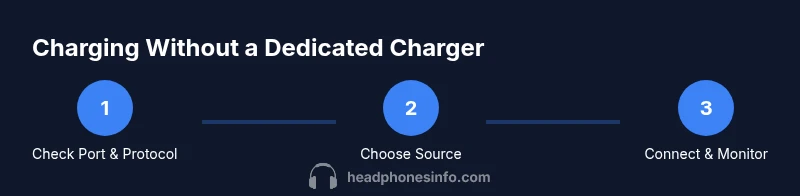
Identify port and charging protocol
Check your headphones manual or product page to confirm whether they use USB-C, Lightning, or another interface for charging, and note the supported charging standard (for example, USB-C PD or standard USB-C). This ensures you pick a compatible power source and cable.
Tip: If in doubt, start with the included cable and a known-good USB power source. - 2
Choose a compatible power source
Select a source that aligns with the headset’s charging protocol, such as a computer USB port, a PD-enabled power bank, or a PD car charger. Avoid sources that force nonstandard voltages or unregulated adapters.
Tip: Prefer PD-capable sources for faster, safer charging. - 3
Connect cable securely
Attach the cable firmly to both the headset and the power source. Ensure there are no loose connections and that the cable isn’t twisted or bent at sharp angles.
Tip: Use a cable with good strain relief to avoid wear at the ends. - 4
Observe indicators and safety
Turn on the power source and watch the headset’s charging indicator. If you notice heat, strange smells, or sparking, disconnect immediately.
Tip: Stop if charging indicators don’t appear after a short period. - 5
Troubleshoot common issues
If charging doesn’t start, try another port or cable, and verify the source is delivering power. If problems persist, consult the manufacturer’s support resources.
Tip: Document your tested configurations for future reference. - 6
Finalize and store equipment
Safely disconnect when charging is complete, wind down cables to prevent wear, and store everything in a cool, dry place away from heat sources.
Tip: Label spare cables to reduce accidental mix-ups.
People Also Ask
Is it safe to charge headphones from a computer USB port?
Yes, if the headset supports USB charging over USB-C and you use a proper cable and port. Monitor for heat and charging indicators and avoid forcing power through non-certified accessories.
Yes, you can use a computer USB port as long as your headset supports USB charging and you use a certified cable.
Can I charge with a wireless charging pad instead of a cable?
Only if the headset explicitly supports wireless charging. Most headphones charge via USB, so a wireless pad is usually not applicable unless the manufacturer provides wireless charging capability.
Wireless charging is only possible if your headset supports it; most models use USB charging.
What should I do if charging doesn’t start with an alternate source?
First check the cable and port for damage, then try a different source or cable. If issues persist, consult the manufacturer’s support resources or warranty terms.
If charging doesn’t start, check the cables, try a different source, and contact support if needed.
Will using a power bank harm the headphone battery?
No, not if you use a power bank that matches the headset’s charging protocol and carries quality cables. Overheating or wrong voltage can cause issues, so monitor the process.
A properly matched power bank won’t harm the battery, but avoid wrong voltages or poor cables.
How can I tell which power source is best for my headphones while traveling?
Test a PD-enabled power bank and a laptop USB port to see which charges reliably and safely. Carry a spare certified cable for flexibility.
Try a PD power bank and your laptop USB port to see what works best when you’re on the move.
Watch Video
What to Remember
- Verify your charging protocol before connecting any source
- Use PD-capable sources for safe, efficient charging
- Avoid non-certified adapters and damaged cables
- Test multiple sources to identify the most reliable option
- Store accessories properly to extend their life