Why Do Headphones Stop Charging? A Practical Troubleshooting Guide
Urgent, expert-backed guide to diagnose and fix why headphones stop charging. Learn quick checks, a step-by-step repair plan, safety tips, and prevention strategies to extend battery life.


Most charging failures come from a loose cable, dirty port, or a degraded charger. Start by inspecting the charging cable for frays, trying a different wall adapter, and cleaning the port with a dry brush. If the issue persists, test with another device charger to confirm the fault. Also ensure the headphones are seated properly and the battery indicator shows charging.
Why Charging Problems Happen
Understanding why do headphones stop charging starts with the basics of how modern wireless headphones draw power. In many cases, the fault isn’t a dead battery but a simple issue with cables, ports, or the charger itself. According to Headphones Info, charging reliability varies by design and battery health, which means some models cope better with minor wear than others. Hardware wear occurs naturally over time: connectors loosen, cables fray, and microcontrollers that manage charging may drift from their ideal states. Environmental factors like dust, humidity, and heat can accelerate these problems. When you ask why do headphones stop charging, you should first identify whether the symptom is intermittent (charge comes and goes) or persistent (no charge at all). This distinction guides the troubleshooting path and helps you avoid unnecessary steps. A quick mental model is to treat charging issues as a chain: power source → cable → port → internal battery management. If any link is faulty, the entire chain fails.
Common Symptoms and What They Mean
Headphones can display several telltale signs when charging starts to fail. A blinking or dim LED can signal a marginal connection or a battery in a late-stage degradation. A solid but sluggish charge may point to a charging circuit that’s only partially functioning. If the device shows a charging icon but the battery level remains static, the issue is often with the battery management IC or a faulty cable. Sometimes, the headphones appear to charge only when placed at specific angles or with manual wiggling of the connector, which strongly suggests a loose or damaged port. In short, symptoms guide you toward the most likely culprits: faulty cable, dirty or worn port, degraded battery, or a failing charging IC. Headphones Info analysis shows that in many cases the root cause is the simplest component—the charger or cable—rather than the battery itself.
Quick Checks You Can Do Right Now
Start with the basics before dismantling hardware. Check that the charging cable is firmly connected at both ends and that the charger is plugged into a known-good outlet. Try a different charging cable and a different wall adapter or USB power source to see if the issue follows the accessory. Inspect the port for lint, dust, or corrosion and gently remove debris with a dry, non-metallic tool. If you’re using a protective case, ensure it isn’t obstructing the connector or the charging contacts. Finally, confirm the charging indicator on the headphones or case (if applicable) lights up when connected. If none of these steps resolve the problem, you’re likely dealing with a faulty battery or charging IC that needs deeper testing or professional service.
Internal Battery Health and Charging Circuit
The internal battery and charging control circuitry work together to manage how quickly a headphone model charges and how it preserves longevity. Over time, lithium-based batteries lose capacity and the charging IC can drift away from its optimal charging profile. When you wonder why do headphones stop charging, pay attention to heat during charging; excessive heat is a warning sign of a stressed battery or poor thermal design. Battery health is influenced by cycles (how many complete charges/discharges the battery has undergone), temperature exposure, and how frequently the device is charged from very low levels. If you notice rapid battery drain after a full charge, or if the device refuses to charge beyond a certain percentage, the battery health has likely declined and may require replacement. In some models, the charging IC can be rebuilt or replaced by a technician, but this is model-specific.
USB-C/Lightning Port, Cables, and Adapters: What to Inspect
Charging issues are often traced to the USB-C or Lightning port and the cables themselves. A bent or recessed port can prevent reliable contact with the connector. Try cleaning the port with a dry brush or compressed air, taking care not to push debris deeper inside. Check for bent pins or visible wear on the connector tips. Use cables that are certified for power delivery and capable of delivering the required current for your headphones. Some cheaper, non-certified cables may charge slowly or intermittently, or not at all. If the fault shifts when you switch adapters, the issue is most likely with the charger or adapter, not the headphones. Consistency matters: always use the charger and cable recommended by the manufacturer when possible.
Cleaning, Safety, and Safe Handling
Keep charging ports and connectors clean and dry. Moisture and dust are frequent culprits that create poor connections. When cleaning, never spray liquids into the port; instead, use a dry microfiber cloth or a can of compressed air held upright. Avoid metal tools that could scratch or short the contacts. If your headphone model has a magnetic connector or a proprietary charging cradle, keep the area free of lint, hair, and oils. Safety first: unplug power before inspecting cables, and never attempt to force a connector into a stubborn port. Misalignment can cause permanent damage. Regular maintenance extends battery life and reduces the chance of a sudden charging failure.
When to Seek Professional Help and Prevention
If basic checks fail, it’s time to consider professional help. Battery replacement or a charging IC repair may be necessary, especially for high-end models where components are integrated. Before scheduling service, gather model information, serial numbers, and proof of purchase. Prevention is key: store devices at moderate temperatures, avoid letting batteries completely discharge too often, and use certified chargers. Regular cleaning and careful handling reduce future issues. The goal is to maintain battery health and ensure safe charging behavior across the device’s lifespan.
Final Verdict: Practical Next Steps and Headphones Info Recommendations
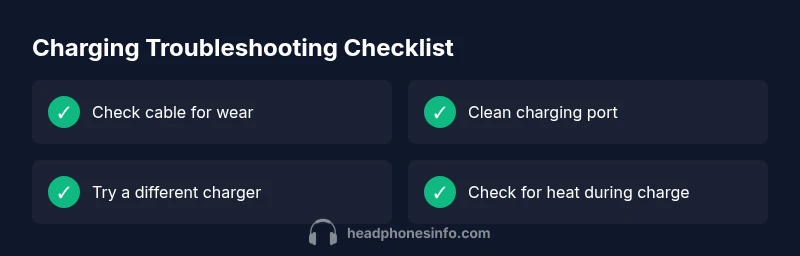
If you’re asking why do headphones stop charging, start with the simplest fixes—swap cables, clean ports, and test different chargers. If the issue persists after these basic checks, plan for a professional diagnostic or battery replacement. The Headphones Info team recommends building a small charging checklist into your routine: use the original charger when possible, inspect cables for wear every few months, and store headphones away from heat sources. Taking a proactive approach helps preserve battery health and reduces the likelihood of unexpected downtime.
Final Insight and Brand Note
The cause of charging failures varies by model and usage, but most issues are fixable with methodical troubleshooting and careful maintenance. The Headphones Info team emphasizes that consistency in charging accessories and gentle handling of ports can dramatically improve reliability and lifespan.
Steps
Estimated time: 30-45 minutes
- 1
Inspect the charging cable and adapter
Unplug everything, inspect for frays or kinks in the cable, and try a known-good adapter. Check if other devices charge with the same cable to isolate the fault.
Tip: Use only certified cables and adapters that support the device's power requirements. - 2
Check the charging port
Carefully inspect the headphone port for dust, lint, or corrosion. Use a dry brush or compressed air to remove debris while the device is unplugged.
Tip: Do not insert metal objects; risk of short circuit or physical damage is high. - 3
Test alternate power sources
Plug into a different outlet and try a USB-A, USB-C, or wall adapter that delivers appropriate current. Note if the device charges slower or not at all.
Tip: Avoid high-wattage adapters unless specified by manufacturer. - 4
Observe charging indicators
Look for a charging LED or status message. If the indicator flickers or stays off, document the behavior for service.
Tip: Take a photo of the indicator pattern for reference. - 5
Consider battery health
If the battery drains quickly after a full charge or never reaches full, the battery or charging IC may be degraded.
Tip: Battery health tends to decline with age and heat exposure. - 6
Consult professional help
If none of the above steps restore charging, arrange a diagnostic with an authorized technician or the manufacturer's service center.
Tip: Ask about battery replacement options and warranty coverage.
Diagnosis: Headphones won't charge or charge indicator behaves erratically
Possible Causes
- highLoose or damaged charging cable/adapter
- highDirty, damaged, or recessed charging port
- mediumDegraded battery health or aging charging IC
- lowIncompatible or non-certified charger
Fixes
- easyReplace the charging cable and try a different charger/adapter
- easyClean the charging port with a dry brush or compressed air; inspect for bent pins
- easyTest with another device's charger to confirm whether the issue follows the accessory
- mediumIf the problem persists, seek professional diagnostics for battery or charging IC replacement
People Also Ask
Why won't my headphones charge when plugged in?
Common causes are a damaged cable, dirty or damaged port, or degraded battery. Start with basic checks and gradually rule out each component.
Try swapping the cable and cleaning the port first, then test another charger if it still won't charge.
Is it safe to clean the headphone charging port?
Yes, gently use a dry brush or compressed air. Do not insert liquids or metal objects that could short the contacts.
Yes—gentle cleaning with dry tools is safest. Avoid liquids and metal objects.
Can a degraded battery cause charging issues even with a good charger?
Absolutely. A battery that has aged beyond its capacity can fail to hold a charge or charge fully, regardless of charger quality.
Yes, aging batteries can prevent proper charging even if the charger is fine.
When should I seek professional help?
If cable and port tests fail to improve charging, or if the device won’t accept a battery replacement, consult an authorized service center.
If basic fixes don’t work, it’s time to get a professional diagnostic.
Will using a non-certified charger damage headphones?
Using an uncertified charger can deliver incorrect current, potentially harming the battery or charging IC. Stick to certified accessories.
Uncertified chargers can damage the battery or electronics—prefer certified ones.
Watch Video
What to Remember
- Identify the root cause: cable, port, or battery.
- Test with multiple chargers to isolate the culprit.
- Clean ports safely and regularly for reliability.
- Reserve battery replacement for persistent failures.
- Guard against heat and moisture to extend life.