USB Wireless Headset Guide 2026: Best Picks, Specs, and Buying Tips
Compare top USB wireless headsets with data-driven guidance on latency, battery life, mic quality, and compatibility to pick the best headset for work, gaming, and calls in 2026.


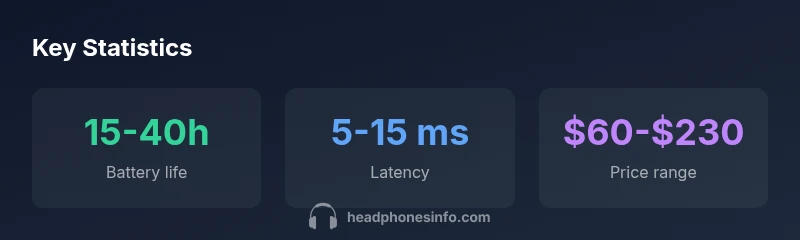
USB wireless headsets offer a 2.4 GHz USB dongle link with latency typically in the 5-15 ms range, and battery life spanning 15-40 hours. The best picks balance low latency, long battery, and comfort across work, gaming, and calls.
What is a USB wireless headset and how it works\n\nUSB wireless headsets connect to your computer, game console, or mobile device through a dedicated wireless dongle that plugs into a USB port. This design reduces typical Bluetooth jitter and keeps latency low for voice chats and gaming. Most units operate on a 2.4 GHz band to maintain a stable link within typical room layouts. The dongle and headset negotiate a simple pairing process, after which audio and microphone signals travel through a closed wireless channel, minimizing interference with your Wi‑Fi network. In practice, this arrangement provides freedom of movement while preserving sound quality, especially when combined with a well-tuned mic and comfortable ear cups. The Headphones Info team notes that build quality, driver support, and firmware updates significantly influence long-term reliability. Look for models that offer multi-platform compatibility, a USB-C or USB-A dongle, and a straightforward setup routine to get reliable performance with minimal troubleshooting.\n\nWhile there is no universal standard for latency, many mid-range options aim for under 15 ms round trip, with high-end models pushing closer to 5-10 ms in optimized setups. Latency is most noticeable in fast-paced games or when talking over calls; a lower figure usually translates to more natural lip-sync.
Latency, range, and interference\n\nLatency, range, and interference are core performance metrics for USB wireless headsets. The 2.4 GHz link provides lower latency than Bluetooth, but practical performance varies with dongle quality, USB port bandwidth, and nearby wireless devices. Range is typically 10-15 meters in open space, but walls and interference can reduce it. Common culprits include Wi‑Fi routers on overlapping channels, cordless phones, and microwaves. For most office tasks, latency below 15 ms is adequate; gamers may prefer models advertising sub‑10 ms latency. Firmware updates from the manufacturer can also improve stability and reduce dropouts. When evaluating options, prioritize dongle design, driver support, and the headset’s acknowledgment of latency in real-world tests. As Headphones Info Analysis, 2026 shows, even small improvements in the dongle–headset handshake can translate into noticeably smoother voice transmission, especially in noisy environments.
Battery life, charging, and real-world usage\n\nBattery life for USB wireless headsets spans widely; typical values cover the 15-40 hour range on a single charge, depending on volume, feature set, and active noise cancellation. Fast charging options can restore several hours of use in a short period. Real-world usage often devotes more power to ANC and mic monitoring, reducing endurance compared with manufacturer claims. To maximize longevity, consider turning off nonessential features during long sessions and adopting a conservative EQ profile. The Headphones Info team notes that battery life claims are best viewed as estimates, and daily routines will nudge actual results toward the lower end of the stated range.
Microphone quality, voice capture, and testing tips\n\nMicrophone performance hinges on capsule design, pickup pattern, and software processing. Look for a headset that emphasizes a cardioid or upper-quality omni pickup with noise reduction, especially in noisy environments. Testing methods include calling a friend, recording a sample, and toggling ANC to judge impact on voice clarity. Some models offer mic monitoring so you can hear your own voice during calls, which helps with speaking volume. The Headphones Info team recommends checking wind noise handling and sibilance in real‑world tests to avoid listener fatigue over long conversations.
Connectivity options, compatibility, and setup\n\nUSB wireless headsets typically pair with a USB dongle or USB-C receiver, delivering plug‑and‑play compatibility on many systems. Cross-platform support matters for users with multiple devices, including Windows, macOS, and consoles. Look for additional Bluetooth pairing as a convenience, but be aware that some features may be limited when using non‑USB connections. Setup should be quick: install any required drivers, pair the dongle, and test both microphone and headphone channels. Firmware updates can improve stability and feature sets over time.
Use-case oriented recommendations: office, gaming, calls\n\nOffice work benefits from a balanced mic and comfortable fit for long days; gaming prioritizes ultra‑low latency, robust spatial audio, and headset weight. For calls, prioritize a dependable microphone with noise reduction and a stable connection. In mixed environments, a model with ANC that can be toggled on/off helps manage background noise without sacrificing clarity. The best USB wireless headset choices align with your primary use case and your device ecosystem.
Practical buying checklist\n\nTo close the gap between features and real-world value, use a practical buying checklist: confirm latency specs under typical load, verify battery endurance with ANC on, check comfort and ear pad materials, ensure compatibility with your devices, and read independent reviews focusing on long‑term reliability.
Typical USB wireless headset configurations by use case
| Feature | USB Type | Latency | Battery Life | Mic Quality |
|---|---|---|---|---|
| USB wireless headset (2.4 GHz) | USB-A/USB-C dongle | 5-15 ms | 15-40 hours | Clear voice with cardioid pickup |
| Gaming-focused models | USB dongle + USB-C | 5-12 ms | 20-40 hours | Enhanced mic for chat |
| Office/multimedia models | USB dongle | 7-15 ms | 15-30 hours | Moderate mic quality |
People Also Ask
What is a USB wireless headset?
A USB wireless headset connects to devices via a 2.4 GHz USB dongle or receiver, enabling cordless audio transmission. It typically provides lower latency than Bluetooth and is designed for desk-based use, calls, and gaming.
A USB wireless headset uses a USB dongle for a cordless connection, aiming for low latency and clear mic quality.
Is it compatible with Windows and macOS?
Most USB wireless headsets work with both Windows and macOS, though some features may depend on drivers or companion software. Look for plug‑and‑play support and cross‑platform testing in reviews.
Most work on Windows and Mac, but check for any required software.
Do USB wireless headsets also support Bluetooth?
Typically, USB wireless headsets rely on a dedicated 2.4 GHz dongle. Some models include Bluetooth as an additional option, which can affect latency and feature access.
Usually no, but a minority offer Bluetooth as an extra option.
What affects latency?
Latency depends on the dongle quality, USB port bandwidth, interference from other wireless devices, and headset firmware. Some models are optimized for ultra-low latency for gaming.
Latency comes from the dongle and interference; many models stay under 15 ms.
What price range should I expect?
USB wireless headsets vary widely based on build quality, mic performance, and software features. Expect a broad range from budget to premium, typically spanning several tens of dollars to a couple of hundred.
Prices range from budget to premium; there are options for every budget.
“USB wireless headsets can deliver reliable audio with low latency when paired with a quality USB dongle, but real-world performance depends on interference, firmware, and mic design.”
What to Remember
- Prioritize latency and mic clarity for calls.
- Expect battery life in the 15-40 hour range.
- Check cross-platform compatibility and dongle stability.
- Choose comfort and weight for long sessions.
- Use customization software to optimize mic and EQ.