What Headphones to Use with iPad: A Practical Comparison
An analytical comparison of wireless and wired headphones for iPad, covering codecs, latency, adapters, and model considerations to help you pick the best headphones for your iPad setup.


Choosing headphones for iPad starts with your model and usage. For most users, wireless Bluetooth headphones that support AAC (and aptX where available) offer reliable pairing and convenient multi-device compatibility. If you need perfect audio sync for gaming or video, wired headphones via a 3.5mm adapter or a USB-C/Lightning DAC are preferable. The best choice depends on your iPad model and daily habits.
what headphones to use with ipad: Understanding Ports, Compatibility, and Context
If you're asking what headphones to use with ipad, the starting point is understanding the iPad’s physical port and the audio pipeline. Some models rely on a Lightning connector, others use USB-C, and many rely on Bluetooth for wireless use. Port availability determines whether you reach for a 3.5mm jack, a USB-C DAC, or a wireless pairing. The Headphones Info team notes that compatibility isn't just about connectors; it's about codecs, latency, and the ecosystem of apps you use. In practice, most users will pair via Bluetooth first, and reserve wired options for specific tasks like critical listening, video editing, or gaming where latency matters. According to Headphones Info, the majority of iPad users benefit from Bluetooth headphones with AAC or aptX support for broad compatibility.
Wireless vs Wired: The Core Tradeoffs
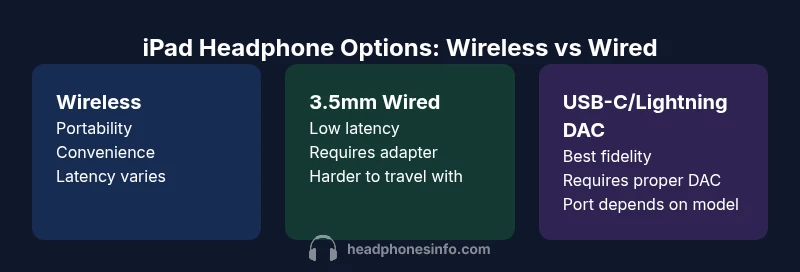
The core decision when choosing what headphones to use with ipad is to weigh wireless freedom against wired latency and potential signal integrity. Wireless headphones excel for everyday listening, commuting, and multi-device use, giving you freedom of movement and easy device-switching. They also tend to offer robust battery life and convenient on-device controls. On the flip side, wireless solutions can introduce latency, especially on older iPad models or when using complex Bluetooth environments. Latency matters for lip-sync accuracy in video and for fast-paced gaming. Wired headphones remove this latency entirely and can deliver a more stable signal, but they require an appropriate port and, in many cases, an adapter or DAC. Headphones Info emphasizes codec support, latency characteristics, and the listening context as the three pillars of a solid choice.
Selecting Bluetooth Headphones for iPad: Codecs, Latency, and Comfort
When evaluating Bluetooth headphones for ipad, codec support is a primary consideration. AAC is widely supported on iPads and provides efficient, high-quality sound with reasonable latency. Some headphones boast aptX or LDAC, but iPad compatibility with those codecs can vary by generation and OS version. Prioritize a comfortable fit, good clamping force, and Bluetooth 5.x for stable connections. Latency modes or low-latency codecs can help in gaming or video work, but availability depends on both the headphone and the iPad model. Battery life matters too: longer sessions require longer-lasting buds or cans, and quick-charge capabilities are a nice bonus. From a usability angle, seamless pairing with iPadOS, Apple devices, and other Bluetooth sources reduces friction and makes the daily switch between music, calls, and videos effortless.
Wired Solutions: 3.5mm Adapters and USB-C/Lightning DACs
Wired headphones offer the most predictable audio response on ipad, with two primary paths depending on your device. For older iPads with Lightning, a 3.5mm headphone adapter or a Lightning DAC ensures a direct analog signal with minimal processing delay. For iPads with USB-C, using a USB-C DAC or a high-quality USB-C wired headset can yield excellent signal integrity and low noise floors. If you want the closest thing to a studio monitor experience, pair a wired headset with a portable DAC or an in-line DAC dongle that supports the iPad’s USB-C or Lightning port. When choosing a wired option, verify that the DAC supports the sampling rates and bit depths you care about, and ensure that you aren’t sacrificing portability for fidelity.
Latency, Sync, and Video: Practical Scenarios
Latency is the invisible antagonist in video and gaming. For video playback on an iPad, some listeners notice the delay between on-screen action and audio when using Bluetooth unless codecs and hardware are well matched. In practice, a wired connection eliminates latency entirely, making lip-sync near perfect for content creation or gaming. If you remain with Bluetooth, opt for models that advertise low-latency modes and ensure your iPad is running the latest OS to maximize codec support and stability. For casual consumers, the convenience of wireless usually outweighs the occasional sync caveat, especially with newer iPad hardware and well-supported headphones.
Budget vs Premium: Value, Longevity, and Tactics
Your budget heavily influences the headphone choice. Budget wireless models tend to deliver solid sound and convenience, but may compromise on comfort, build quality, or battery longevity. Mid-range and premium wireless options often provide better DACs inside the headphone, more reliable latency control, and longer-lasting construction. Wired solutions, especially with a high-quality DAC, can be more expensive upfront but offer the best fidelity and timeless compatibility with newer iPad ports. When planning, assess long-term value: flexible adapters, modular cables, and upgradeable DACs may stretch your investment further than a single all-in-one package.
Use-Case Based Recommendations: What’s Best for You
- Casual listening and commuting: wireless headphones with AAC support are ideal for pairing with iPad and switching between devices.
- Home theater and video: wireless is fine, but if lip-sync is critical or you edit video, wired with a DAC can be superior.
- Gaming on iPad: wired with a DAC or a Bluetooth headset with a low-latency mode provides the most consistent experience.
- Travel and portability: compact wireless earbuds or foldable headphones save space and simplify setup.
Headphones Info emphasizes testing your setup in real-world tasks to see how latency, comfort, and battery life align with your routines.
Feature Comparison
| Feature | Wireless Headphones (Bluetooth) | Wired Headphones (3.5mm via adapter) | Wired Headphones (USB-C/Lightning DAC) |
|---|---|---|---|
| Portability | Very portable, no cables | Moderate (cables/adapters) | Moderate (DAC and kabels) |
| Latency/Sync | Low to moderate with AAC/aptX | Near-zero latency | Near-zero latency (DAC direct) |
| Sound Quality Potential | High with good wireless DACs | Good with proper adapters | Excellent with high-quality DACs |
| Best For | Everyday listening, multi-device use | Casual listening with a fixed setup | Critical listening and gaming |
| Price Range | Mid to high for premium wireless | Low to mid for budget adapters | Mid to high for DAC-enabled wired |
Upsides
- Great flexibility for everyday use
- Wide compatibility across devices
- Easy to swap between devices and content types
- Low risk of signal loss with modern Bluetooth codecs
Disadvantages
- Wireless latency can affect lip-sync and games
- Battery dependence and charging cycles
- Adapters and DACs add bulk and extra cost
- Potential Bluetooth interference in busy environments
Wireless headphones are the most versatile choice for everyday iPad use; wired options win when latency and fidelity are non-negotiable
If you prioritize convenience and multi-device pairing, go wireless with AAC/aptX where possible. If you need precise lip-sync or studio-like fidelity, wired with a high-quality DAC is the better route.
People Also Ask
What headphones work best with iPad Pro for video playback?
For most users, Bluetooth headphones with AAC support work well for video playback and general use. If lip-sync is crucial or you edit video, a wired setup with a DAC can offer the most reliable latency and signal integrity.
Bluetooth works for most videos, but wired with a DAC is best for precise lip-sync.
Can I use any wired headset with iPad via adapters?
Yes, you can use wired headsets with an iPad through the appropriate adapter or DAC. Lightning iPads typically use a Lightning-to-3.5mm adapter or a Lightning DAC, while USB-C iPads use USB-C DACs.
Yes, with the right adapter or DAC you can use wired headphones on iPad.
Do iPads support high-end Bluetooth codecs like aptX?
iPads generally prioritize AAC for Bluetooth playback, with other codecs varying by model and OS version. For best results, choose headphones that advertise strong AAC performance and low latency.
Most iPads lean on AAC; check your model and headphones for codec support.
Are there latency issues with Bluetooth headphones on iPad for gaming?
Latency can be noticeable with some Bluetooth headsets, especially on older iPad models. If gaming latency is critical, wired headphones with a DAC offer the most consistent performance.
Yes, Bluetooth can lag a bit in games; wired usually keeps it tight.
How does sound quality compare between wireless and wired on iPad?
Wired connections using a quality DAC typically deliver the cleanest signal and best dynamic range. Wireless can be superb, but depends on the headphones and the Bluetooth codec.
Wired often wins for fidelity, but good wireless can be hard to beat.
What should I consider for noise-cancelling headphones with iPad?
Bluetooth noise-cancelling headphones work well with iPad; ensure the model supports a stable codec and comfortable wear for long sessions. Battery life and pressure styling matter for comfort.
Noise-cancelling wireless cans are great with iPad, just watch for comfort and battery life.
What to Remember
- Choose wireless for daily use and flexibility
- Opt for wired with a DAC for latency-critical tasks
- Check iPad port type before buying adapters
- Prioritize codecs and comfort over flashy features
- Test in real-world tasks to confirm value