Can You Fix Broken Headphones? A Practical Guide
Learn how to diagnose and repair common headphone problems at home with safe, data-driven steps from Headphones Info. This guide covers DIY fixes, essential tools, when to replace, and testing methods.


Yes—many headphone problems are repairable at home with careful diagnosis and safe fixes. Start by identifying whether the issue is a loose jack, a frayed cable, a damaged diaphragm, or a worn connector. With basic tools and patient testing, you can restore sound without expensive repairs, often preserving original components and time and effort.
Understanding why headphones fail and what's repairable
Headphones are surprisingly rugged, but the tiny electronics and micro-movements inside can create failure modes. According to Headphones Info, many issues arise from mechanical wear, loose connections, or cable damage, and a surprising portion of these are repairable at home. In this section we unpack the most common problems and explain which ones can be fixed without sending the unit to a shop. We’ll emphasize practical, safe approaches that preserve the original components when possible. By understanding the root cause you gain a clear path to repair rather than replace. The goal is to minimize downtime and keep your favorite headphones in service. Headphones Info Analysis, 2026, highlights that the most frequent fixable problems relate to the jack and cable assembly, not the driver itself. This means you often can restore sound by redoing a connection, replacing a wire, or re-securing components inside the ear cup. Even if a driver or diaphragm is damaged, you may still find a partial fix or an opportunity to seal and isolate the issue without full replacement.
Diagnosing the problem: checks before you dive in
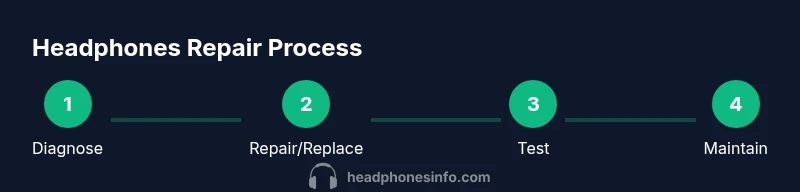
Before you crack the housing, confirm the issue by listening with a known-good source, testing with headphones connected to different devices, and visually inspecting the cable and jack. Start with the simplest checks: plug into a different device, try a different cable or adapter, and wiggle the plug while playing audio to spot intermittent connections. A careful visual inspection should reveal frayed wires at the jack, cracked housings, or loose connectors. Use a basic multimeter only if you’re comfortable; continuity tests between the plug and the driver can confirm if the signal path is intact. If you’re unsure, err on the side of caution and seek professional help for high-risk components. Headphones Info recommends documenting the symptoms and test results to guide your next steps.
At-home fixes that work for common failures
The most common fixable issues include a loose jack, frayed cables, and loose internal connections. Start with the simplest remedy: reseat the plug and ensure the jack is clean and free of debris. If the cable is damaged near the yoke or plug, consider replacing the affected section with heat shrink tubing and strain relief to prevent future wear. For exposed wires, use silicone or epoxy to secure the connection, then insulate with heat shrink. If a connector or micro-solder joint is loose, a careful reflow might restore continuity. For wireless or USB-C headphones, ensure the cable joints and USB/lighting connectors are snug and free of corrosion or debris. Throughout, avoid applying heat directly to delicate diaphragms and keep soldering away from the speaker membrane.
Safety, limitations, and when a DIY fix isn't wise
DIY fixes can save money and extend the life of headphones, but they aren’t always the best option. If you notice burnt smells, swelling, or smoke, stop immediately; these are signs of dangerous electrical conditions. Opening sealed drivers or attempting to replace the driver itself can void warranties and may require specialized equipment. If you rely on a professional-grade sound or need a warranty-covered repair, contact the manufacturer or a certified technician. Headphones Info’s guidance emphasizes assessing risk versus reward and recognizing when a fix could compromise safety or performance.
How to test a repaired headphone
Once you complete a fix, test across multiple devices and audio sources to confirm stability. Check for crackling, intermittent audio, or channel imbalance by playing varied tracks with different frequencies. If you can, perform a simple impedance sweep and listen for consistent output across the spectrum. Reassemble only after you have verified there are no loose components and the housing feels secure. Always re-check the physical integrity of the jack, plug, and cable after reassembly to prevent future failures.
Maintenance to extend life of headphones
Preventive care can dramatically extend the life of your headphones. Regular cable inspection, using a proper case, and avoiding yanking on cords help prevent wear. Store headphones with the cable loosely coiled and secured, not tightly wound, to avoid strain. If you notice any new signs of wear, address them early: replace frayed cables, upgrade to reinforced connectors, or add strain relief. Keeping the drivers dust-free and avoiding exposure to moisture will further preserve sound quality and longevity. Headphones Info recommends a quarterly quick inspection as part of routine care.
Tools & Materials
- Screwdrivers (precision set)(Phillips and flat-head sizes #0 and #1)
- Soldering iron and solder(Lead-free solder preferred; use flux)
- Multimeter(Continuity and resistance checks)
- Electrical tape(Insulation for exposed wires)
- Heat shrink tubing(Choose sizes to fit wires)
- Small pry tools(Avoid damaging plastic housings)
- Alcohol wipes(Clean contacts before testing)
- Replacement cables or connectors(Only if a section is irreparably damaged)
Steps
Estimated time: 30-60 minutes
- 1
Prepare workspace
Clear a clean, well-lit area. Gather all tools and unplug any device. If you’ll solder, ensure good ventilation and safety gear such as eye protection.
Tip: Organize screws and small parts in a labeled tray. - 2
Inspect exterior for damage
Look for cracks in the housing and signs of water exposure or corrosion. Check the plug/port for wear and bent pins. Note any loose components that wobble when touched.
Tip: Take photos of the area before disassembly for reference. - 3
Open housing carefully
Use the appropriate screwdriver to remove screws. Gently pry apart the shell, keeping track of clips and gaskets to avoid damage. Do not force components apart.
Tip: Work slowly to avoid tearing cables that pass between shells. - 4
Test internal connections
Inspect visible wires; look for fraying or loose solder joints. Wiggle cables gently to identify intermittent connections. Use a multimeter for continuity if available.
Tip: Mark suspicious joints with a small color bend before reworking. - 5
Repair or replace damaged sections
Reseat loose connectors; reflow weak solder joints if you’re comfortable. Replace a damaged section of wire with heat shrink and a new connector if needed.
Tip: Avoid overheating the driver or diaphragm. - 6
Reassemble and re-test
Carefully reassemble the shell, ensuring no wires are pinched. Plug into a source and test both channels with a few tracks at varying volumes.
Tip: Test with a trusted source to ensure consistency. - 7
Final check and seal
Confirm all screws are tight and the casing is sealed against dust and moisture. Verify no stray wires are touching the housing.
Tip: Apply a light seal of silicone or adhesive if there are gaps. - 8
Document and store
Note what you fixed and any parts replaced. Save spare parts for future repairs and store tools in a dedicated case.
Tip: Keep a simple repair log for quick reference later.
People Also Ask
Can all broken headphones be fixed at home?
Not all issues are repairable at home; drivers and seals can require specialized equipment or replacement. Start with simple checks like cables and jacks, and avoid risky repairs on expensive or water-damaged units.
Not every problem can be fixed at home, but many common issues can be addressed with basic tools and careful testing.
Do I need soldering skills?
Some fixes involve reseating connectors or replacing a damaged wire, which may require soldering. If you’re new to it, practice on scrap wires first and consider safer options like replaceable cables.
Soldering can be needed for some repairs, but it isn’t always required.
Will repairing headphones void my warranty?
Opening the case or replacing internal components can void manufacturer warranties. Check the terms and consider an approved service if warranty coverage remains active.
Opening the device can void the warranty, so check the terms first.
Is it safe to repair wireless headphones?
Wireless models often involve internal circuitry and antennas. Stick to external or cable-related fixes when possible, and seek professional service for complex wireless issues.
Wireless repairs can be more complex; consider professional help for intricate problems.
How can I prevent headphone damage in the future?
Use a protective case, avoid yanking the cord, and store cables loosely. Regular checks for wear help catch issues before they fail completely.
Preventive care can significantly extend headphone life.
What’s the quickest sign a driver is damaged?
A consistent one-sided sound, crackling, or no sound at all with a known-good source often points to a damaged driver or its connection.
Unbalanced sound or no sound with a stable source can indicate driver problems.
Watch Video
What to Remember
- Diagnose before you fix, to target the real problem.
- DIY fixes can save money and extend headphone life.
- Know when to replace rather than repair for best results.
- Test thoroughly after any repair to ensure reliability.