Play Electric Guitar with Headphones: A Step-by-Step Guide
Learn how to play electric guitar with headphones instead of an amp. This guide covers gear, wiring options, latency tips, and a clear setup to practice quietly while preserving tone.


Yes—you can play electric guitar with headphones instead of an amp. This setup uses a headphone amp, DI box, or an audio interface with amp-sim software or a dedicated pedal. Route the guitar signal through the interface or amp model, then feed headphones for quiet practice while preserving feel and dynamics.
Why headphones are a practical choice for practice
Playing with headphones is a practical choice for apartments, late-night practice, or studio sessions where volume matters. But it is not just about turning down the knob; headphones can preserve the guitar's response and dynamic range when paired with the right gear. According to Headphones Info, headphone-based practice has grown because it delivers a quiet, faithful representation of your tone without feedback, mic bleed, or neighbor complaints. The Headphones Info team found that if you optimize the signal path, using a DI box or a real headphone amp and an appropriate interface, the feel of palm muting, string attack, and sustain remains convincing. In short, this approach lets you practice sharper rhythm, accurate intonation, and musical expression without overpowering a room.
Understanding the signal path
To get clean, headphone-friendly tone you need to understand the signal path from guitar to your ears. The basic route is guitar pickup → direct input or pedal chain (if used) → impedance-matching device or interface → headphone output. Each element affects dynamics, decay, and feel. Language matters here: impedance, latency, and output level all influence how your fingers translate into sound inside the headphones. When you choose a direct path with headphones, you become dependent on the accuracy of the model or hardware you have selected, so setting expectations around tone and dynamics is essential.
Hardware options: headphone amps, DI boxes, and interfaces
Three broad paths exist for headphone practice. A dedicated headphone amplifier gives a contained signal with its own volume control and can preserve feel better than plugging into a speaker, but it lacks some flexibility. A DI box or instrument-level input into an audio interface provides the most accurate tone when paired with amp sims or modeling pedals. Finally, a compact multi-effects unit with a headphone out can serve as an all-in-one solution. Headphones Info analysis shows that latency and tonal accuracy improve when you route through a proper interface rather than a direct guitar-to-headphone feed. The key is matching impedance and ensuring the interface can drive your headphones comfortably.
Software options: amp sims and modelers
Software amp sims replicate the sound of a guitar amp and cab in a way that is highly flexible for headphone listening. You can run these from a computer, tablet, or even a mobile device with an audio interface. When using software, take advantage of built-in cabinet simulations, mic choices, and EQ to tailor the tone for headphones. Because headphones respond differently than a room, you may need to tweak low-end resonance and midrange presence to avoid muddiness or harshness. The benefit is a vast palette of tones without loud volumes or room reflections.
Latency, impedance, and tone: what to expect
Latency is the delay between your picking a string and hearing the sound in the headphones. In practice, a modern interface can keep latency low enough for comfortable playing, especially for rhythm and scale work. Impedance matching matters: guitar pickups expect a high-impedance load, while headphones require a much lower impedance. If you skip impedance matching, you risk weak volume, dull tone, or noisy signals. Expect a subtle but noticeable difference in attack and decay when you switch between hardware, DAW, or pedal routes. With careful routing, you can preserve note length and articulation while staying in sync with your backing track.
Typical connection diagrams
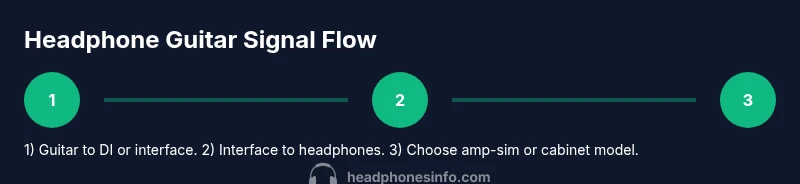
- Hardware route: guitar → guitar cable → DI box (optional) → audio interface → headphones (via interface headphone jack)
- All-in-one unit: guitar → unit's instrument input → unit's headphone output
- Software route: guitar → audio interface → computer/phone/tablet → amp-sim plugin → headphones Each diagram has its own pros and cons, especially regarding latency and tone. If you are unsure, start with a familiar setup and test with a metronome to confirm timing.
Real-world setups: three routings you can try
- Setup A (quiet practice): guitar → audio interface (DI) → headphones. Use a mid- to high-quality plugin amp sim and cabinet model for a convincing tone.
- Setup B (compact and portable): guitar → small headphone amp (built-in cabinet simulation) → headphones. This minimizes gear and reduces cable clutter.
- Setup C (tabletop studio): guitar → DI box → audio interface → DAW with amp-sim plugin; monitor via headphones or loudspeakers only if allowed. This route gives the most control over tone shaping and recording possibilities.
Troubleshooting common issues
- No sound or very quiet output: check that the interface is selected as the output device and that headphones are plugged into the correct jack.
- Loud hum or buzz: check for ground loops, try another USB port, or use a DI box to isolate the signal.
- Unpleasant tone or dry feel: adjust amp-sim cabinet, mic emulation, EQ, and ensure you are not clipping the input stage.
- Latency feels slow: enable low-latency monitoring in the DAW, reduce buffer size, or use a dedicated headphone amp for real-time play.
Tips for getting the best tone with headphones
- Use closed-back headphones with good isolation to minimize leakage and keep your tone focused.
- Start with a fresh power supply for your interface; stable power reduces noise.
- Keep the headphone volume at a comfortable level to preserve your hearing and maintain dynamics.
- Use proper impedance matching and ensure the interface and headphones present a friendly load to the pickup.
Safety and listening habits
Listening at high volumes can damage hearing over time. Set a target maximum level and take regular breaks. Consider using limiter features or a headphone amp with safe listening modes. The Headphones Info team and listening safety resources emphasize protecting hearing during long practice sessions and recording tasks.
Practice routines and progress tracking
Plan 15- to 20-minute focused sessions three times a week using headphones. Alternate between rhythm drills, scales, and small riffs to train timing and articulation. Use a metronome or backing track to measure progress, and log your results to observe improvements in tone, accuracy, and dynamics.
Authority sources
- https://www.nidcd.nih.gov/health/noise-induced-hearing-loss
- https://www.cdc.gov/niosh/topics/noise/
- https://www.aes.org
Tools & Materials
- Electric guitar(Any guitar with pickups)
- Audio interface(Low-latency, instrument input-capable)
- Headphones(Closed-back, 32-80 ohms recommended)
- Instrument cable(1/4 inch TS or TRS)
- USB-C or USB-A cable(Interface to computer/phone)
- DI box(Impedance matching if needed)
- Amp sim software(Optional for tone variety)
- Computer or tablet(For software amp sims)
Steps
Estimated time: 15-30 minutes
- 1
Decide path for tone
Choose between hardware and software routes. This affects latency, tone, and setup complexity. Consider your environment, budget, and whether you plan to record.
Tip: If unsure, start with a simple hardware route to minimize latency. - 2
Gather essential gear
Assemble the guitar, interface or DI box, headphones, and a suitable cable. Ensure the interface supports instrument input and has a reliable headphone output.
Tip: Check that all cables are intact and connectors are snug. - 3
Connect guitar to interface or DI
Plug the guitar into the interface instrument input or the DI box, depending on your route. Verify the input level is not clipping.
Tip: Start with a conservative input gain; you can raise it later for desired headroom. - 4
Connect headphones to the output
Plug the headphones into the interface headphone jack or the headphone amp. Set initial volume at a safe, comfortable level.
Tip: Use a fixed volume and adjust from there to protect your hearing. - 5
Set a basic tone
If using amp sims, select a clean preset with cabinet simulation. Avoid extreme EQ cuts that can dull the sound in headphones.
Tip: Mute the room and check for mud or harshness with a simple riff. - 6
Enable latency optimization
If using a DAW, enable low-latency monitoring and reduce buffer size to improve feel. If using a standalone unit, enable its direct monitoring mode.
Tip: Close background apps to free CPU and reduce glitches. - 7
Test with a metronome or loop
Play along with a metronome at a comfortable tempo to assess timing and feel. Adjust tone and dynamics to stay in sync.
Tip: Record a short clip to review timing after the session. - 8
Save your settings
Store the chosen patch, amp-sim, and level settings for quick recall during future sessions.
Tip: Create a naming convention that describes the setup and mood.
People Also Ask
Can I plug my guitar directly into headphones without any interface or amp?
No. Guitars require an impedance-matching device such as a DI box or an audio interface to drive headphones properly. Directly feeding headphones from a guitar can result in weak sound or no sound and may stress the guitar pickup circuit.
You cannot plug a guitar directly into headphones. Use a DI box or an audio interface to match impedance and get a usable signal for headphones.
What is latency and why does it matter when using headphones?
Latency is the delay between you playing a note and hearing it in the headphones. High latency makes timing feel off and can disrupt rhythm practice. Reducing buffer size and using a low-latency monitoring path helps keep timing accurate.
Latency is the delay between your playing and what you hear. Lower latency means your timing stays in sync with your metronome or backing track.
Are amp sims or pedal plugins good for headphone practice?
Yes. Amp sims and modeling pedals are excellent for headphone practice because they offer many tones without loud amps. They also let you tailor cabinet and mic simulations to suit headphones.
Amp sims are great for headphone practice; they give lots of tone options without loud amps.
What headphones work best for guitar practice?
Closed-back headphones with good isolation and a comfortable fit are typically best for guitar practice. Look for a driver in the 32 to 80 ohm range and solid frequency response in the guitar’s tonal area.
Closed-back headphones with solid isolation work best for practice and tone accuracy.
Do I need to worry about impedance and volume?
Yes. Impedance matching ensures a strong, clear signal and proper volume. Use an interface with instrument input or a DI box to present a friendly load to the guitar.
Impedance matters; match it with the right interface or DI box to avoid weak signal or tone loss.
Can I use wireless headphones with a guitar setup?
Wireless headphones can work but may introduce additional latency. If you require precise timing, wired headphones or a reliable low-latency path are preferable.
Wireless can work, but latency varies. For timing-critical practice, wired headphones are safer.
Watch Video
What to Remember
- Choose hardware or software path based on latency and tone needs.
- Impedance matching is essential for clean signal and volume.
- Amp sims and DI boxes offer flexible yet quiet practice options.
- Monitor with headphones at safe listening levels.
- Document patches for repeatable practice sessions