Can You Play Electric Guitar in Headphones? A Practical Guide
Learn how to play electric guitar with headphones, including gear selection, setup, practice routines, and tips to balance tone, feel, and latency for silent rehearsals and recording.


Yes — you can play electric guitar through headphones, and many players use headphone-based setups for silent practice, late-night sessions, or recording. Route your guitar through an amp modeler or audio interface and monitor with closed-back headphones to minimize sound leakage. The main trade-offs are feel, tone, and latency, which vary with gear. With the right headphones and signal chain, you can practice effectively without disturbing others.
Why headphone practice is popular among guitarists
Silent practice is not a compromise; it's a strategic choice. According to Headphones Info, many players adopt headphone-based practice to keep neighbors happy, work around apartment living, and record without re-amping. The method isn't new, but modern gear makes it more effective than ever. When you wear headphones, you can dial in a private tone and directly compare settings without volume pressure in the room. This is especially useful for late-night sessions, beginners who want focus, and pros who need quick take-downs for ideas. The core idea is to create a monitor chain that delivers a usable feel and clear tone while keeping sound contained. The choice of headphones, amp modeler, and interface will shape your perceived dynamics and response, but the core workflow remains the same: connect, monitor, practice, and adjust.
In practice, you’ll want to think about isolation, comfort, and how the headphone sound translates your guitar’s attack and sustain. Headphones that reproduce a wide dynamic range can help you hear subtle picking nuances, chord voicings, and palm-muted profiles more clearly. The Headphones Info team emphasizes that a good silent practice setup is not just about not waking the neighbors—it’s about creating a consistent sonic reference you can rely on during long sessions or when you’re working with a DAW or recording software.
noteSecondParagraphDarkModeImpactOrNotTouchedSpeculativeContentForGuidanceAndNotAbsoluteFacts
Tools & Materials
- Electric guitar(Any electric guitar with a standard 1/4" output. Ensure the jack is clean and the cable is in good condition.)
- Headphones(Closed-back is usually best for isolation; impedance around 32–80 ohms is versatile for most interfaces.)
- Audio interface or amp modeler with headphone output(USB or Thunderbolt interface with a clean instrument input; alternatively a dedicated headphone amp can work.)
- 1/4" guitar cable(Spare length for comfortable signal routing; keep cables tidy to minimize noise.)
- Optional: DAW or mobile recording app(Useful for capture, looping, and A/B testing tones.)
Steps
Estimated time: 30-45 minutes
- 1
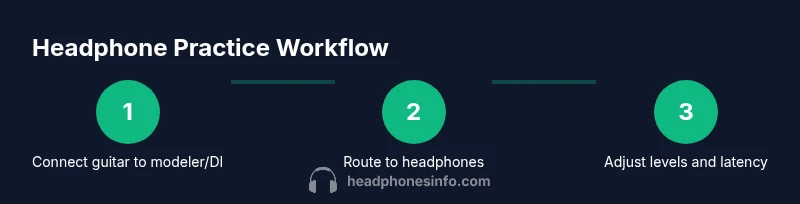
Connect your guitar to the modeler or DI
Plug your guitar into the input of your chosen amp modeler, USB audio interface, or DI box. Ensure the level is set to avoid clipping and that the device recognizes the guitar signal. This step establishes the primary signal path for silent practice.
Tip: Start with a low input level to protect both the guitar pickup and headphones from sudden loud transients. - 2
Choose a headphone monitoring path
Decide whether you’ll monitor directly from the guitar modeler, through the audio interface, or via a dedicated headphone amplifier. Each path has its own latency profile and tonal characteristics. Pick the route that gives you the most stable, low-latency monitoring.
Tip: If latency is noticeable, try a direct headphone out from the interface and disable extra processing. - 3
Set initial levels and latency
Set the headphone volume to a comfortable level first, then adjust the guitar input gain so you don’t hear clipping. Check your DAW buffer size or device latency and select the smallest value that remains stable. This minimizes delay between your picking and what you hear.
Tip: Latency is more noticeable on fast picking and riffs—keep buffer low when possible. - 4
Dial in tone for headphone listening
Apply a simple, clean tone with minimal effects to begin, then gradually introduce EQ and effects that translate well to headphones. Compare with and without headphones to ensure the tone remains coherent and not overly bright or muffled in the earcups.
Tip: Headphones can alter perceived brightness; rely on reference mixes or studio monitors if available. - 5
Create a practical practice routine
Structure your practice around scales, arpeggios, and a few riffs, using a metronome. Switch between clean and overdriven models to hear how dynamics translate in headphones. Save favorite tone snapshots for quick recall during sessions.
Tip: Use loops or a drum track to build musical coherence while listening through headphones. - 6
Review, adjust, and record
Record a short take to compare tone and timing with a reference. Adjust modeler settings, headphone EQ, and interface gains based on the recording. Rehearse the same material until you achieve a satisfying balance between feel and clarity.
Tip: Always recheck safety levels before long sessions to protect hearing.
People Also Ask
Can I use Bluetooth headphones for guitar practice?
Bluetooth headphones can work for silent practice, but they often introduce noticeable latency with real-time guitar signals. For best results, prefer wired headphones or a low-latency monitoring setup when timing and feel matter most.
Bluetooth headphones may introduce delay, so wired monitoring is generally preferred for precise timing.
Will headphones reproduce the same tone as a real amp?
Headphones can faithfully reproduce many tones with the right modeler or interface, but the experience will differ from a real amp and cabinet. You may notice less air and different speaker interactions, which is normal.
Headphones can be close, but they aren’t a perfect amp replica.
Is latency a big problem with headphone practice?
Latency is common with digital monitoring, especially over wireless paths. It can be minimized by using wired connections, lowering buffer sizes, and choosing gear with optimized headphone monitoring. If timing feels off, adjust those settings.
Latency can be annoying, but you can reduce it with the right setup.
What headphones are best for guitar practice?
Prefer closed-back, over-ear designs with flat or gentle bass that won’t overwhelm dialogue with guitar mids and highs. Brands vary, but look for comfort, good isolation, and a suitable impedance range for your interface.
Look for comfort, isolation, and a guitar-friendly response curve.
Can I record while listening through headphones?
Yes. Use a direct input or audio interface to route the guitar signal to your recording software while monitoring through headphones. This setup helps you capture true performance without leaking sound into the room.
You can record and monitor quietly at the same time.
Watch Video
What to Remember
- Practice with headphones to gain silent-rehearsal discipline
- Choose a monitoring path that minimizes latency
- Tune tone specifically for headphone listening
- Record tests to compare and improve accuracy
- Protect hearing with safe volume and regular breaks