Can You Use Headphones Instead of an Amp for Electric Guitar? A Practical Guide
Explore how to use headphones instead of an amp for electric guitar. Compare routing options, pick gear, and follow a step-by-step setup for silent practice, recording, and studio tones.


Yes — you can listen to electric guitar through headphones by feeding the instrument signal into a headphone-capable interface, amp modeler, or multi-effects processor. Dedicated headphone amps exist, but most players preserve tone by using an audio interface or amp simulator. For silent practice, connect the guitar to an interface or pedal with a monitored headphone output.
What you gain and lose by going headphone-first
According to Headphones Info, the question can you use headphones instead of an amp for electric guitar is less about whether it’s possible and more about what you’re trying to achieve. Headphone-first setups offer quiet, immediate feedback and remarkable convenience for late-night practice, studio work, and speedier tone iteration. They let you explore amp-modeling, effects chains, and speaker emulation without waking the neighborhood or lugging heavy gear. The trade-offs, however, include a different sense of attack, dynamics, and air compared with a real cabinet. Cabinet resonance and room acoustics contribute to feel, sustain, and perceived loudness—elements that headphones don’t reproduce in the same way. Headphones also emphasize the digital artifacts of amp sims and modelers, so your choice of gear, samples, and cabinet simulations matters more than you might expect. This section outlines how to balance silent practice goals with tone quality and response, and how different pathways affect dynamics, latency, and realism. Headphones Info’s analysis shows that most players reserve headphone setups for practice, recording, and direct-to-DAW work, while reserving real amps for gigging and live tone.
Pathways: three main ways to route guitar signal to headphones
There are three common approaches to feeding guitar signal into headphones, each with its own strengths and caveats. The fastest path is a direct feed from an audio interface with an instrument input, which preserves clean tone and lets you run amp sims or IR-based cabinets inside a DAW or standalone unit. The second path uses an amp modeler or multi-effects unit that includes a headphone output; this route emphasizes portability and immediacy, making it ideal for practice rooms or quick recording sessions. The third path involves a dedicated headphone amplifier, sometimes with its own DAC, for improved ergonomics and a more tactile feel. Each path has trade-offs in latency, tone fidelity, and workflow. If you’re aiming for studio-quality tones while staying silent, the interface-plus-amp-sim approach is usually the most flexible. If you want a compact rig without a computer, a modeler or pedal with a headphone out can be enough for practice. For long sessions where weight and setup time matter, a purpose-built headphone amp offers simplicity at the cost of some tonal flexibility. Headphones Info emphasizes testing multiple routes to determine which best matches your goals and playing style.
Equipment considerations: quality, latency, tone
When you switch from an on-stage amp to headphones, the most immediate questions are about tone fidelity and monitoring latency. The core idea is to minimize latency while preserving an authentic feel. Start with gear that offers low-latency monitoring and a transparent signal path. The choice of headphones matters as well: closed-back designs reduce bleed into mics and help you hear subtle dynamics, while impedance and sensitivity affect how loud and clear the signal is at a given headphone amp or interface output. The quality of your amp-modeling software or pedal chain determines how convincingly you reproduce cabinet resonance, speaker breakup, and micro-dynamics. If you’re recording, you may prefer a clean DI path into your DAW with a high-quality impulse response (IR) cabinet. If you’re practicing, you might lean on a ready-made amp sim with built-in IRs and effects for instant tones. Always confirm that your interface supports instrument-level input and check for reliable driver stability to avoid dropouts during play. Headphones Info’s guidance here is to aim for a setup that feels natural to your hands and ears, not just technically flawless on paper.
Room and studio contexts: practice, recording, and stage vibes
Silent practice is a boon for time-shifted schedules, but it also reshapes how you approach tone. In a personal studio or shared space, headphones let you experiment with aggressive high-gain tones without neighbor complaints. In a home-recording context, headphone rigs enable you to track multiple layers with consistent tone, allowing easier re-amping and late-stage tweaks. When you’re preparing for a live session or audition, you might still prefer mic’d amp tones, but headphones can be a critical rehearsal tool for dialing in amp-model settings before you commit to a take. In live rooms or studios, consider using a monitor-capable interface or a dedicated headphone amp with balanced outputs to reduce noise and ensure consistent playback across listening environments. Headphones Info notes that the most satisfying headphone setups reproduce convincing dynamics, respond well to picking and playing style, and remain comfortable after long practice blocks.
Practical setup examples: concrete connection diagrams
Below are common, realistic paths you can implement today. Example A uses a simple interface route, ideal for home practice and DAW work. Example B uses a modeler pedal with its own headphone output, great for quick sessions without a computer. Example C pairs a dedicated headphone amp with a direct guitar signal, useful in small studios or practice spaces where a compact, hands-on rig is preferred.
Example A — Guitar to Interface → Headphones
- Guitar -> Instrument input on audio interface
- Interface → Headphones via headphone output
- Use amp sim or cabinet IR inside the DAW or in a standalone plugin
Example B — Guitar to Modeler with Headphone Out
- Guitar -> Modeler pedal input
- Modeler headphone/monitor out → headphones
- Choose built-in amp models and effects; adjust gain to avoid clipping
Example C — Guitar to Headphone Amp → Headphones
- Guitar -> Cable to headphone amp input
- Headphone amp -> headphones
- Dial cabinets, mics, and output stage feel inside the amp modeler if available
Troubleshooting common issues
Latency, tone mismatch, and headphone comfort are the three main pain points when you ditch the real amp. If you hear a delay between picking and sound, enable direct monitoring or reduce the buffer size in your interface software. If the tone sounds lifeless or metallic, double-check the chain order, sample rate, and the amp-model or IR you’re using, and try a different impulse response. Bleed from the signal into nearby microphones can be a concern in small rooms; closed-back headphones help, and calibrating room tone with proper headphone balance reduces perception of latency. If volume is inconsistent across sessions, compare headphone impedance against the output stage of your interface or amp-modeler; match headphones to the driver power of your gear to avoid under- or overpowering the headphone stage. Finally, ensure all firmware and drivers are updated to minimize dropouts and glitches during play.
Quick-start checklist for headphone-first practice
- Define your goal (silent practice, recording, or both).
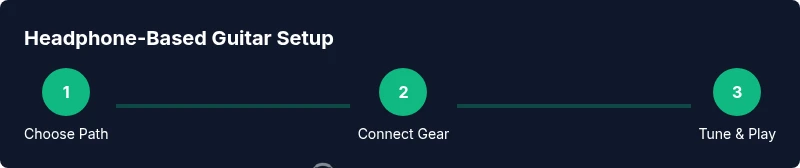
- Choose a pathway (interface, modeler, or headphone amp).
- Gather essential gear (interface with instrument input, closed-back headphones).
- Set up connections and verify input/output levels.
- Dial in your tone using amp-modeling options and IRs.
- Test with your typical playing style and adjust for latency and feel.
- Save your preferred presets for quick recall.
Tools & Materials
- Audio interface with instrument input(Prefer one with low-latency performance and good driver support)
- Amp modeler or multi-effects pedal with headphone output(Look for built-in IRs and flexible routing)
- Closed-back headphones(Low impedance (32-64 ohms) works well with most interfaces)
- Guitar cable (1/4 inch TS)(High-quality shielded cable reduces noise)
- Optional DI box or re-amping device(Useful if you later want to re-amp or send a clean DI for recording)
- DAW or amp-sim software (optional)(Helps sculpt tones and capture takes)
Steps
Estimated time: 30-60 minutes
- 1
Define your goal
Identify whether your primary need is silent practice, recording, or live pre-pro; this determines your routing path and gear choices. Write down the exact requirements: latency tolerance, tone targets, and whether you need dry or processed signal.
Tip: Document your goals before buying gear to avoid over- or under-specifying kit. - 2
Choose your signal path
Decide between interface-based setups, pedal-modelers with headphone outputs, or a dedicated headphone amp. Each path has different latency, tone, and workflow implications. Pick the route that best aligns with your goals.
Tip: If you plan to record, starter with interface plus amp sims for flexibility. - 3
Gather compatible gear
Assemble the essential items from the toolsMaterials list. Ensure power, drivers, and cables are in good condition and that the interface supports instrument-level input.
Tip: Test each component individually before integrating into the full chain. - 4
Make the connections
Connect the guitar to the interface or modeler input, route the output to headphones, and power up devices in a safe sequence. Set initial levels conservatively to avoid clipping during the first playthrough.
Tip: Always start with a low gain and increase gradually as you confirm tone and volume. - 5
Dial in tone with amp sims
Select an amp model or IR that matches your goal (clean, crunch, or high gain). Adjust presence, gain, and EQ to taste; use built-in effects sparingly at first to avoid masking dynamics.
Tip: Begin with a neutral preset and tailor tone to your playing style, not the model’s default. - 6
Set levels and monitoring
Balance guitar input gain with headphone output level. Use direct monitoring if available to minimize latency; keep headphones comfortable for longer sessions.
Tip: Keep headphone volume at a safe listening level to protect your ears. - 7
Test and refine
Play typical riffs and dynamics, then adjust as needed. Save your preferred presets for quick recall during practice or recording sessions.
Tip: Record a quick take to verify that the tone and feel translate to a mixed context.
People Also Ask
Can I use Bluetooth headphones for guitar practice?
Bluetooth headphones introduce noticeable latency and compression, which can throw off timing when playing in real time. For serious practice, wired headphones or a monitoring solution with direct monitoring is recommended.
Bluetooth introduces delay; use wired headphones for accurate timing and feel.
Do I need a DI box when using headphones?
A DI box is not strictly required for most headphone setups that go through an interface or modeler. It can be helpful if you’re sending a clean signal to a PA or recording device, or if you’re re-amping later.
Usually not needed for headphone practice, but useful for recording or re-amping.
Will headphone tone ever equal a guitar amp?
Headphone tones produced by amp sims and IRs can be very convincing, but they rarely match the tactile feel and cabinet interaction of a cranked guitar amp. Use high-quality sims and IRs to get as close as possible.
Amp sims can be very convincing, but may not perfectly replicate a real amp’s feel.
Is latency ever completely eliminated when using headphones?
Latency can be minimized with direct monitoring and low-latency interfaces, but a small amount of delay often remains when routing through software. Plan for a tiny delay and practice around it.
Direct monitoring helps a lot, but a tiny delay may still exist.
What’s a good starter setup for headphone practice?
A basic starter setup is guitar -> audio interface (instrument input) -> headphones, with a simple amp-sim or IR preset. This keeps things simple while you learn the workflow and tone shaping.
Start simple—interface plus one amp sim to learn the basics.
Watch Video
What to Remember
- Define your goal before wiring the setup.
- Choose a path that matches your tone and latency needs.
- Dial in amp-model tones rather than chasing a perfect cabinet sound.
- Monitor with headphones to minimize room bleed.
- Test, record, and save presets for consistency.