Can You Use Headphones with an Electric Guitar? A Practical Guide
Discover how to listen to an electric guitar through headphones safely and effectively. Explore signal paths, gear options, setup steps, and troubleshooting for silent practice and high-quality tones.


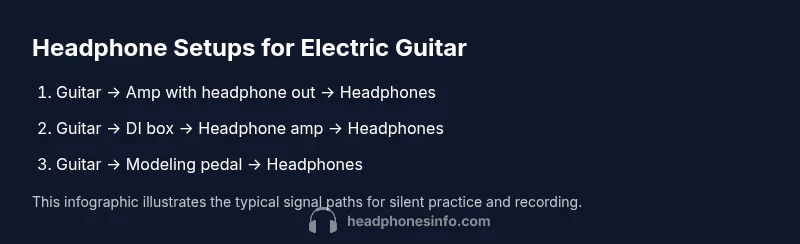
Yes, you can hear an electric guitar through headphones, but the signal path matters for tone, dynamics, and how loud you need to practice. The most reliable setups route the guitar through an amp with a dedicated headphone output, or through a modeling/DI device that feeds a headphone jack. For silent practice, choose gear that preserves tone and dynamic response while keeping volume off.
Can headphones work with electric guitars?
Yes, you can hear an electric guitar through headphones, but the signal path matters for tone, dynamics, and how loud you need to practice. According to Headphones Info, the most reliable setups route the guitar through an amp with a dedicated headphone output, or through a modeling/DI device that feeds a headphone jack. If you already own a small practice amp with a headphone out, that is often the simplest starting point. For those without a suitable amp, a direct injection (DI) box or a multi-effects pedal with a headphone monitor can reproduce your rig's feel without waking the neighbors. In all cases, you want a path that preserves dynamic response, minimizes latency, and aligns with your monitoring needs.
Signal path fundamentals: why impedance, latency, and tone matter
The tone you hear in headphones depends on the entire chain from guitar to headphone. Each link—the pickup, the amp or modeling device, and the headphones themselves—adds color and latency. Headphones Info analysis shows that keeping impedance and latency in check preserves feel and articulation, especially when playing fast passages or expressive bends. If you value a faithful response, prioritize setups that minimize extra buffering and avoid devices that aggressively color the signal. Finally, ensure the route you choose matches your practice goals: silent rehearsal, direct recording, or live jam-tracking.
How placement changes tone and feel
Where you place effects and routing gear can noticeably alter your experience. A direct guitar-to-headphone path with a clean modeler will feel different from an amp-based route where the amp’s preamp, power amp, and speaker cabinet interact with your pickups. In many cases, a DI or modeling pedal placed before a headphone amp provides the most consistent sound across headphones, because it isolates the guitar from room acoustics and speaker coloration. Tailor placement to your genre, pickup type, and preferred monitoring depth.
Practical options for different budgets
If you’re starting small, an amp with a built-in headphone out is the simplest route. For more flexibility, pair a DI box or a compact headphone amplifier with your guitar, then use an appropriate cab/IR model to shape the tone. If you want maximum tonal flexibility, a dedicated modeling processor or multi-effects unit with a headphone jack offers the widest range of amp simulations, effects, and speaker responses. Each approach has benefits and tradeoffs; your choice should reflect how you practice, record, and perform.
Safety and listening etiquette
Always monitor at moderate levels to protect your hearing, especially during long practice sessions. Some headphone models emphasize bass or high frequencies, which can mask other cues; balance the mix by adjusting tone controls or using a flatter headphone response when needed. If you notice latency or hiss, re-check your cabling, ensure you aren’t doubling devices unnecessarily, and consider a dedicated headphone amp that bypasses speakers entirely.
Tools & Materials
- Electric guitar(Solid-body electric guitar with a standard 1/4)
- Amplifier with headphone output or dedicated headphone amplifier(Important for simple, realistic monitoring; avoid amps without a headphone jack for easy silent practice)
- Headphones(Closed-back dynamics or wired over-ear can help minimize bleed and provide better isolation)
- DI box or modeling pedal(Optional but strongly recommended for cleaner signal paths and studio-friendly tones)
- 1/4 inch instrument cable(Standard guitar cable for connecting guitar to amp input or DI/modeling device)
- 1/4 inch to 3.5 mm adapter(Useful if your headphone amp accepts 1/8)
Steps
Estimated time: 45-75 minutes
- 1
Decide your headphone path
Choose whether you will use an amp's headphone out, a dedicated headphone amplifier, or a modeling/DI setup. This choice will influence tone, latency, and how much gear you need.
Tip: Think about your practice goals first: silent rehearsal or recording compatibility. - 2
Assemble your gear
Gather guitar, selected monitoring device (amp with headphone out, DI, or modeling pedal), and headphones. Have a clean space to minimize cable clutter and ensure a safe signal path.
Tip: Pre-check all cables for wear and labeling; a quick cable check saves time during setup. - 3
Connect the guitar to the monitoring device
Plug the guitar’s 1/4
Tip: Ensure the device is powered off before making connections to avoid pops or damage. - 4
Hook up the headphones
Connect headphones to the output on the monitoring device. If you’re using an amp, use its dedicated headphone jack or patch the signal through a separate headphone amp.
Tip: Set headphone volume to a safe level before playing anything expressive. - 5
Dial in your tone and levels
Adjust gain, EQ, and effects to taste while listening through headphones. Start with a mid-gain setting and moderate volume, then tweak for your genre.
Tip: Keep an eye on the input and output meters to avoid clipping. - 6
Test and refine
Play a short riff and assess tone, dynamics, and latency. If needed, swap paths or tweak parameters for better alignment with your playing style.
Tip: Record a quick take to compare how the tone translates when listened back on speakers.
People Also Ask
Can I plug headphones directly into my guitar?
Most guitars lack a true headphone jack; you’ll need an amp with a headphone output or a DI/modeling device to route the signal to headphones.
Guitars usually don’t have built-in headphone jacks, so use an amp output or a modeling pedal to listen privately.
Will using headphones affect tone?
Some tone coloration can occur due to the headphone impedance and the device’s circuitry. Modeling/DI paths often reproduce a more consistent tone.
Yes, headphones and the device can color tone; modeling paths tend to be more consistent.
Do I need a DI box?
A DI box is optional but helpful if you want a clean, direct signal with flexible routing to headphones or recording interfaces.
A DI box helps get a clean signal and easy routing to headphones or interfaces.
Is it safe to practice at high volume with headphones?
Headphones can deliver loud sound directly to the ears; always start low, increase gradually, and take breaks to protect hearing.
Start with low volume and increase slowly to protect your hearing.
What about wireless headphones?
Wireless headphones are convenient but may introduce latency; for timing-critical playing, prefer wired connections or low-latency wireless options.
Wireless can add latency; for tight timing, wired is safer, or choose low-latency wireless.
Can I record with headphones on?
Yes—use an audio interface or modeling device that outputs a line-level signal to your DAW while you monitor in headphones.
Yes, you can monitor in headphones while recording through an interface for clean tracks.
Watch Video
What to Remember
- Choose a signal path that preserves tone in headphones
- Prefer DI/modeling routes for consistent results
- Monitor at safe levels to protect hearing
- Test with riffs to ensure timing and feel stay intact