Headphones Water Damage: Quick Troubleshooting Guide
Learn how to tell if headphones are water damaged with practical signs, safe drying steps, and when to seek professional help. Urgent, actionable guidance from Headphones Info to protect your listening gear.


Water exposure often reveals itself quickly in headphones. If you notice rust on connectors, foggy ear cushions, crackling audio, unresponsive controls, or sudden power loss after getting wet, moisture likely reached internal parts. Power down safely, unplug, and dry the exterior first. Headphones Info guides you through the most common signs, quick triage, and when to seek professional help.
How to tell if headphones are water damaged: quick cues
Understanding how to tell if headphones are water damaged starts with recognizing the most common immediate cues after you’ve been exposed to moisture. Look for visible signs like corrosion on connectors, foggy or damp housing, or ear cushions that feel damp. Listen for changes in sound quality such as crackling, muffling, or intermittent channel imbalance. If the device powers on but behaves abnormally after a splash or spill, moisture intrusion is a likely culprit. According to Headphones Info, prioritizing safety and controlled drying can prevent further harm and preserve your gear. This topic is relevant for both wired and wireless models, including noise-cancelling headphones and waterproof-branded units. The goal is to identify whether water exposure is the root cause before attempting any repair.
External signs you can safely inspect
External inspection is quick and risk-free. Check the following:
- Charging ports, 3.5mm jacks, or USB-C ports for corrosion or discoloration.
- Cables and connectors for stiffness, kinked shields, or moisture residue.
- Ear pads or cushions for dampness or odor, which signal internal humidity.
- Device casing for bulging surfaces or cracked seals that may allow water ingress.
If you spot any of these signs, proceed with caution. Do not plug in or charge the headphones while signs of moisture are present. Headphones Info recommends documenting conditions (water type, duration of exposure) to inform any service decisions later.
Internal signs and risks you should respect
Moisture inside the housing or drivers poses the highest risk. Signs include crackling audio, channels cutting in and out, or complete silence on one side. Water can corrode contacts, micro-electronic components, or the battery in wireless models. Do not attempt internal disassembly unless you are a trained technician, as this can void warranties and increase damage risk. If corrosion is visible on internal connectors during safe inspection, it’s a strong signal to seek professional service.
Safe, initial DIY checks you can perform (without voiding warranty)
You can perform a controlled dry-out without disassembling the device:
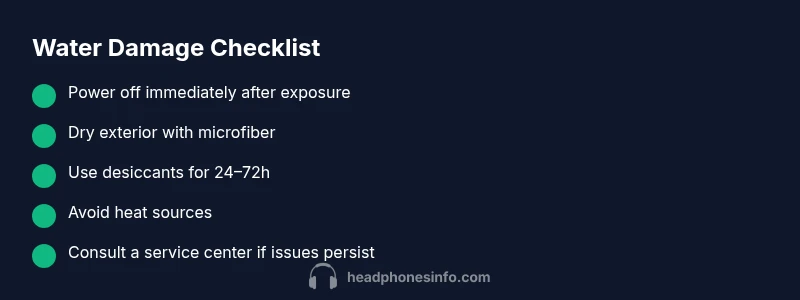
- Power off and unplug the headphones from any devices.
- Wipe exterior moisture with a dry microfiber cloth and let any residual water evaporate in a dry, room-temperature area.
- Do not use heat sources like hairdryers or ovens; heat can warp plastics or damage seals.
- If you have desiccants (silica gel), place the headphones in a sealed bag with them for 24–72 hours to draw out moisture. After drying, re-test with care and at a low volume.
Remember: never attempt to charge or power on wet headphones. If you’re unsure, seek professional support before testing.
Diagnostic flow you can follow at home
This flow helps you prioritize actions after water exposure:
- Symptom: Audio crackling or one-sided sound after splash.
- Likelihood: Moisture intrusion is high for compromised signal paths; lower if no power or no response.
- Action: Dry exterior, inspect ports, use desiccants, and test after 24 hours. If issues persist, proceed to professional diagnosis.
For devices with detachable cables or accessories, test each component separately to isolate the problem. If the issue remains after drying, moisture may have reached internal circuits, warranting service.
Step-by-step: drying and testing after exposure
- Power off and unplug the headphones from all devices.
- Wipe surfaces with a dry microfiber, then lay the unit on a dry towel.
- Place in a sealed container with silica gel or a desiccant sachet for 24–72 hours.
- After drying, reassemble (if applicable) and test at very low volume to gauge responsiveness.
- If sound is still distorted or one side is silent, avoid charging and seek professional repair or replacement guidance.
Tip: Keep a log of exposure details and drying times to share with a technician, which can speed up diagnostics.
When to seek professional help and warranty considerations
If there is any moisture, corrosion, or inconsistent audio after a drying period, it’s wise to contact an authorized service center. Water damage can void warranties, especially if opened or disassembled by non-authorized personnel. A professional repair may restore function or confirm that replacement is more cost-effective. Always check your warranty terms and the brand’s service policy before attempting pricey internal work. Headphones Info recommends acting conservatively when the device has been exposed to liquids.
Prevention tips to protect headphones from water damage
Prevention is easier than repair. Consider these practices:
- Keep headphones away from pools, showers, and the ocean. Avoid using them near water sources unless they are specifically rated for moisture.
- Use protective cases or sleeves for travel and outdoor activities; store them in a dry place when not in use.
- Dry your hands before handling devices and remove them from damp environments promptly.
- For wireless models, be mindful of charging ports and ensure they are fully dry before reconnecting to a power source.
Consistent maintenance and mindful storage dramatically reduce the risk of moisture-related failures. Headphones Info emphasizes that prevention is the best fix.
Steps
Estimated time: 60-90 minutes active work; 24-72 hours drying time
- 1
Power down and unplug
Shut the headphones off completely and disconnect from any devices. Do not attempt to charge while moisture is suspected.
Tip: Power down first before any physical inspection to prevent short circuits. - 2
Remove accessories and inspect exterior
Detach any removable cables or cases and wipe visible moisture from all surfaces with a dry microfiber.
Tip: Keep track of detachable parts to avoid misplacing during reassembly. - 3
Dry with desiccant and air
Place the unit in a sealed bag with silica gel or a similar desiccant for 24-72 hours; avoid heat sources.
Tip: Silica gel is safer than rice and more effective at drawing moisture. - 4
Re-test at low volume
After drying, reconnect to a low-power source and test with very quiet audio. Monitor for crackling or imbalance.
Tip: If anomalies return, stop testing and seek professional help. - 5
Decide on repair vs replacement
If problems persist after a thorough dry-out, evaluate repair costs versus replacement, especially for older units or costly models.
Tip: Keep receipts and warranty info handy when consulting a technician.
Diagnosis: Headphones were exposed to water and now exhibit issues
Possible Causes
- highMoisture breached seals and entered drivers/electronics
- mediumCondensation inside housing affecting connections
- mediumWater damage to detachable cables or USB/3.5mm jack
- lowBattery or wireless module corrosion
Fixes
- easyPower off and unplug immediately; avoid charging
- easyDry exterior surfaces with microfiber; place in desiccant for 24-72 hours
- mediumInspect connectors for corrosion and replace if needed; consult service center for internal drying
People Also Ask
What are the first signs that wireless headphones are water damaged?
Look for corrosion on connectors, moisture in the chassis, foggy earpieces, crackling audio, or one side failing to play sound. These signs indicate moisture intrusion and should trigger careful drying and testing.
Common early signs are corrosion on ports, fogged housings, or crackling audio—if you see these, start a careful dry-out process and avoid charging.
Should I use heat to dry wet headphones?
No. Avoid hairdryers, ovens, or heaters. Heat can warp plastics and push moisture deeper into components. Use room-temperature air and desiccants instead.
Don’t use heat. It can damage parts. Use air drying and desiccants instead.
Can water-damaged headphones be fixed at home?
Some external moisture issues can be addressed at home, but internal damage often requires professional service. If you’re unsure, consult the manufacturer or an authorized repair center.
Some fixes you can do at home, but internal damage usually needs a pro. When in doubt, seek authorized repair.
Does an IP rating guarantee post-exposure water resistance?
IP ratings refer to in-use resistance, not post-damage resilience after exposure. Water exposure can compromise seals and internal circuitry regardless of the rating.
IP ratings don't guarantee after water exposure. Damage can happen even if a device is rated for some moisture.
When is replacement cheaper than repair?
If repair costs approach or exceed the device’s value, or if multiple components are damaged, replacement is often more economical. Compare quotes from service centers with the cost of a new model.
If repairs cost as much as a new model, replacement is usually the smarter option.
Should I rinse headphones after exposure to saltwater?
Rinsing with fresh water is generally not recommended unless advised by the manufacturer. Salt can corrode metal parts and leave residues that promote corrosion.
Rinsing isn't usually advised; it can spread salt and worsen corrosion. consult guidance first.
How long should I wait before testing after a spill?
Give at least 24 hours for exterior drying, and up to 72 hours if you used desiccants. Longer drying reduces residual moisture and improves testing accuracy.
Wait at least a day or two after drying before testing for best results.
What should I do if the unit already shows corrosion?
Corrosion indicates likely internal damage. Stop using the device, avoid charging, and seek professional evaluation to determine repair feasibility.
If you see corrosion, stop using it and get a pro to assess repair feasibility.
Watch Video
What to Remember
- Identify moisture signs before powering on
- Dry exterior first, then use desiccants
- Avoid heat; never charge wet headphones
- Consider professional repair for internal damage
- Prevent future damage with protective storage