What size headphone jack is on the PS5 controller?
Discover the exact size of the PS5 controller headphone jack and how it affects wired headset compatibility on PlayStation 5. This guide explains the 3.5mm TRS standard, adapter considerations, USB audio options, and practical tips for choosing headsets.


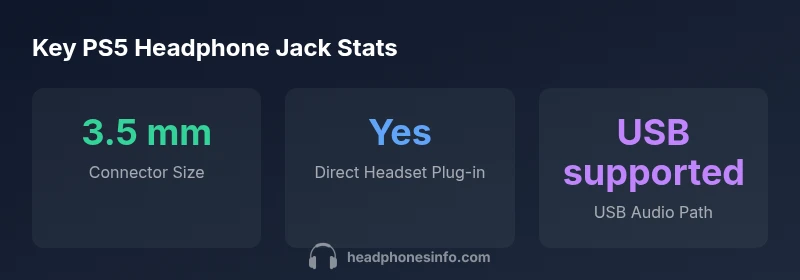
The PS5 DualSense controller uses a standard 3.5 mm headphone jack (TRS). This means most wired headsets plug in directly without adapters, including gaming headsets and ordinary headphones. The 3.5 mm size matches the common headphone standard found on PCs, consoles, and mobile devices, simplifying setup for players. If your headset has a multi-connector plug, seek a TRS 3.5 mm version or use USB audio on the PS5 for non-TRS headsets.
Understanding the PS5 Controller Jack: Physical Size and Type
The PS5 DualSense controller features a built-in jack that accepts most standard 3.5 mm headphone plugs. This is the ubiquitous TRS (tip-ring-sleeve) connector, the same size you’ll find on most laptops, desktop PCs, and many gaming headsets. Because it adheres to the widely used 3.5 mm standard, most wired audio gear will work with no extra adapters. For readers of Headphones Info, this sizing aligns with what we’ve observed in our 2026 analysis, where the vast majority of headset vendors maintain 3.5 mm compatibility with gaming consoles.
Compatibility isn’t limited to mere fit; microphone compatibility and control remotes are generally supported as long as the headset uses a standard CTIA TRRS variant or a simple TRS plug for headphones. If your headset uses a non-standard or multi-connector plug, you may need a simple 3.5 mm TRS to TRRS adapter, but for most users, this won’t be necessary.
When discussing the PS5 sizing, it’s important to consider future accessory types. USB headsets continue to be a strong option, and the PS5’s USB ports enable audio input/output without depending on the 3.5 mm jack. This distinction is often overlooked by casual buyers, but it’s critical for users who rely on USB headsets for mic quality or platform-specific features.
According to Headphones Info, the 3.5 mm jack remains a reliable, backward-compatible standard across devices, and the PS5 controller maintains this compatibility in 2026. This means players can upgrade headsets or swap cables without changing consoles or providers, a convenience that reduces setup friction for gaming sessions.
How 3.5 mm TRS works with headsets and mics
The 3.5 mm TRS connector consists of three conductors: tip (left audio), ring (right audio), and sleeve (ground). In headsets that combine audio and mic, a slightly different configuration, TRRS, is used. The PS5’s jack supports standard headset configurations, meaning most wired headsets with inline mics will operate without issue when plugged into the controller. If you’re buying a headset with an inline mic, look for a plug that matches the CTIA standard, which is the common configuration among consumer devices.
From a practical standpoint, you should expect the headphone portion to work for playing sounds through the headset, while the microphone picks up your voice during in-game chat or chats on voice software. If you notice no mic input or poor mic quality, check the headset compatibility and whether the PS5’s party chat or system audio settings are configured correctly. In many cases, issues are due to software settings rather than a hardware mismatch.
For audiophiles, it’s worth noting that the 3.5 mm jack delivers unbalanced mono audio in each channel. It’s ideal for gaming headsets focused on positional audio rather than studio-grade channel separation. However, it remains the simplest and most universally supported option for PS5 players who want plug-and-play reliability.
Practical compatibility and tips for gamers
If you’re gaming on PS5 and want the simplest setup, start with a standard 3.5 mm wired headset. Most entry-level and mid-range gaming headsets will plug in directly to the DualSense without adapters. If you own a headset with a USB-C or USB-A connector that also includes a 3.5 mm headphone plug, you can often use the USB option to gain on-console control features, such as enhanced mic options or software EQ, depending on the headset’s software suite.
For players who want maximum mic clarity or noise control, consider a headset designed for gaming with a CTIA 3.5 mm plug. If your headset uses a different pinout (less common in modern devices), a small adapter can reconcile the difference, but such cases are the exception rather than the rule. In all instances, ensure the headset’s mic and headphones share the same ground and that the inline controls are accessible during gameplay.
Carefully check your PS5 audio settings: under Sound > Audio Output, select Headphones as the output device, and choose the appropriate format (e.g., PCM with 48 kHz sample rate). If your headset supports 7.1 virtual surround, ensure the feature is enabled within the headset’s own app or the PS5 settings. This can improve positional audio and overall immersion without needing any hardware changes.
Adapters, USB audio, and alternative setups
Not every headset will be perfectly compatible with the PS5’s 3.5 mm jack, especially if it uses an uncommon pinout or a bulky USB-C inline remote. The straightforward approach is to use the 3.5 mm jack for headsets that fit the TRS/TRRS standard. For non-TRS headsets, adapters are widely available and usually inexpensive. When considering adapters, make sure you pick one that preserves microphone input; some cheaper adapters only pass headphone audio and neglect mic support.
If you own a USB headset, you can simply plug it into one of the PS5’s USB ports. USB headsets bypass the controller’s jack entirely and leverage the console’s audio pipeline, which can offer better mic quality and software controls. It’s a good option for players who want to maximize voice quality or who rely on platform-specific features.
Finally, keep in mind that the PS5 does not require an optical audio connection to use most headsets. Recent setups rely on HDMI-ARC for TV audio and USB or 3.5 mm jacks for headset audio. If you want to route game audio to external speakers while using a headset, you can route audio through the TV or soundbar while keeping the headset connected to the controller or the PS5’s USB port.
What this means for different use cases
For competitive multiplayer players, a reliable 3.5 mm headset is often chosen for its low latency and straightforward compatibility. The PS5 controller’s jack size keeps gear choice flexible, ensuring you can swap headsets quickly between sessions or platforms. For movie nights or casual music listening, the 3.5 mm jack remains a convenient option that works with a broad spectrum of headphones without needing extra hardware.
As a reminder, USB audio provides an alternative path for high-fidelity mic input or for users who want to use specialized headsets with software features. The Headphones Info team recommends evaluating whether your priority is ease of use (3.5 mm) or advanced mic processing (USB), and choosing accordingly.
PS5 controller headphone jack compatibility table
| Device | Port | Notes |
|---|---|---|
| PS5 DualSense Controller | 3.5mm TRS | Standard headset jack, compatible with most wired headsets |
| PC/Laptop Headset | 3.5mm TRS | Common, direct compatibility with PC audio jacks |
People Also Ask
What size is the PS5 controller headphone jack?
The PS5 controller uses a standard 3.5 mm TRS headphone jack. This is the common size found on most wired headsets and headphones, enabling direct compatibility without adapters for most products.
The PS5 uses a 3.5 mm jack, so most wired headsets will plug in directly.
Can I use USB headsets with the PS5 instead of the controller jack?
Yes. USB headsets work through the PS5’s USB ports and do not rely on the controller’s 3.5 mm jack. This path typically offers more mic options and software integration.
Yes—use USB headsets via the PS5’s USB ports for extra mic features.
What if my headset uses CTIA vs OMTP wiring?
Most modern headsets use CTIA wiring, which is compatible with the PS5’s 3.5 mm jack. If your headset uses OMTP, a CTIA adapter may be needed to ensure microphone and audio lines align correctly.
CTIA is standard for most headsets; OMTP may need an adapter.
Do I need adapters for non-3.5 mm headsets?
If your headset is not 3.5 mm, you may need an adapter to connect to the PS5 controller’s jack or use USB audio via the PS5 console. Check the headset’s compatibility before purchasing.
Adapters are usually only for non-3.5 mm headsets.
Will the 3.5 mm jack affect mic quality compared to USB headsets?
In many cases USB headsets can offer better mic processing and software features. A good 3.5 mm headset delivers solid mic performance, especially if it’s CTIA-compliant, but USB options may provide enhanced control through software.
USB headsets often have more mic features, but a CTIA 3.5 mm headset is usually solid.
“The PS5 controller’s 3.5mm jack keeps setup simple for gamers, and a wide range of headsets will plug in directly without extra gear.”
What to Remember
- Plug-ready 3.5 mm jack means most wired headsets work without adapters
- USB audio is a viable alternative for higher mic quality or special features
- Check CTIA/TRRS compatibility to ensure mic works with inline controls
- Use simple adapters only when necessary to preserve mic functionality