Why Do Wired Headphones Stop Working? Urgent Troubleshooting Guide
Urgent, practical steps to diagnose and fix wired headphones that won’t play sound. Quick checks, a diagnostic flow, and proven fixes from Headphones Info.


Most wired headphone problems come from a loose, damaged, or dirty connector, or a worn cable. Start by unplugging and reseating the plug, inspecting for visible wear, and testing with a different device or adapter. If sound remains inconsistent, clean the jack and try a replacement cable. According to Headphones Info, these simple checks fix the majority of wired-headphones issues.
Why do wired headphones stop working: a practical overview
When you ask why do wired headphones stop working, you’re likely facing a sudden drop in sound, crackling, or audio that only comes from one side. The quickest approach is to separate symptoms from root causes and perform a few basics before diving into deeper fixes. According to Headphones Info, most failures stem from three areas: the physical connection (plug and jack), the cable’s condition, and the device you’re plugging into. Start with a high-level check: ensure the plug is fully seated, the connector isn’t loose, and the cable isn’t visibly frayed near the plug. If you notice movement changes the sound, the issue is probably the cable or the plug. If reseating doesn’t help, the fault may lie inside the headset or the device jack.
In practice you can isolate the problem with simple, repeatable tests: try another device or another cable, wiggle the plug while listening for crackles, and inspect for dirt or lint in the jack. Your goal is to confirm whether the fault is at the plug, the cable, or the source. With luck, a quick cleaning or a new cable restores full audio without replacing the whole headset. As Headphones Info notes, these basic checks solve the majority of wired-headphone issues.
Common failure modes in wired headphones
Wired headphones fail for repeatable, understandable reasons. Cable wear is a frequent culprit: the inner conductors can break from bending near the plug or along the cord, producing intermittent sound or crackling. The plug itself can corrode or loosen from repeated insertion, especially with daily use. Dirt, lint, or moisture in the 3.5 mm jack can mute one channel or create hums. A defective driver or diaphragm inside the earpiece can cause distortion without external signs. Finally, a problematic source device or adapter (phone jack, PC port, or DAC) can masquerade as a headphone fault. Evaluating these modes helps you decide whether to replace a cable, the jack, or the whole headset.
Quick checks you can do in seconds
- Inspect the plug and cable for visible damage: look for nicks, kinks, or exposed wires.
- Unplug and reinsert firmly to ensure a solid connection.
- Test with a different device or an alternate cable to rule out the source.
- Check the jack for lint or moisture; gently brush with a soft brush.
- Wiggle the plug while listening for crackling; movement-induced sound means a loose connection.
- Try a different adapter or DAC if you’re using a phone, laptop, or desktop port.
- If you use a mic-equipped headset, test the microphone separately to see if the problem affects both channels.
If these quick checks don’t restore sound, move on to the diagnostic flow to identify the root cause.
Diagnostic flow: symptom → diagnosis → solutions
Starting with a symptom (no sound, crackling, or one-sided audio) helps you move quickly to a diagnosis. Symptom: no sound or intermittent crackles. Diagnosis: likely a loose or damaged cable, dirty jack, or connector. Solutions: reseat the plug, clean the jack, or replace the cable. Symptom: sound only in one ear. Diagnosis: possible partial cable break or mono wiring issue. Solutions: inspect the cable for fraying near the plug, swap cables, or use a different device to verify. Symptom: crackling when moving head or adjusting the cable. Diagnosis: internal wire break or poor solder joint. Solutions: replace the cable or headset, and check for micro-movements that trigger contact issues. If symptoms persist after these steps, professional repair or replacement may be required.
Step-by-step fixes for the most common causes
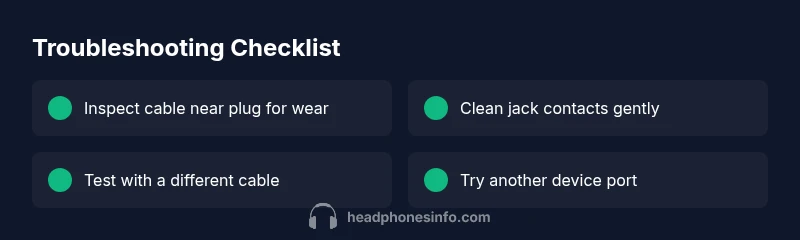
- Easy fix: reseat and test. Unplug, reseat firmly, and test with a different device. Tip: hold the plug with one hand and the device with the other to minimize movement during testing.
- Clean contacts: gently wipe the 3.5 mm connector and the device jack with a microfiber cloth dampened slightly with isopropyl alcohol. Let dry before testing again. Tip: never pour liquid into ports.
- Check for visible cable wear: examine the cable near the plug and along the length for cracks. If you find wear, replace the cable or headset. Tip: avoid sharp bends.
- Swap cables: use a known-good cable to rule out the current one. If the second cable works, the original is faulty. Tip: label cables to avoid confusion.
- Test the jack: try another headset in the same port to verify the port works. If other headphones work in the same port, the issue is the headset.
- If you rely on a dongle/adapter, test with a direct plug if possible; some adapters degrade audio quality or fail intermittently. Tip: keep adapters clean and free of dust.
- When all else fails: consider replacing the headset. If the headset is old or the cable is deeply damaged, replacement is more cost-effective than repairs. Tip: check warranties and service options.
Note: If you’re seeing no improvement after these steps, seek professional repair or replacement.
Prevention and maintenance: keeping wired headphones reliable
- Store cables loosely coiled with padding to prevent kinks.
- Avoid pulling on the cable; grip the plug, not the cord.
- Regularly inspect the plug and jack for corrosion and wear.
- Keep ports clean; use a soft brush or compressed air to remove dust.
- Use a protective case or pouch to avoid crushing cables.
- If you rely on headphones daily, consider carrying a spare cable.
Following these habits reduces future failures and helps you identify problems earlier. The Headphones Info team notes that proactive care can extend the life of your wired headphones.
Steps
Estimated time: 25-40 minutes
- 1
Re-seat the plug and test again
Unplug, inspect for damage, then plug in securely. Test with a known-good device to see if sound returns.
Tip: Firm, controlled insertions reduce contact noise. - 2
Inspect for visible cable wear
Look for nicks, kinks, or fraying along the length, especially near the plug. Replace the cable if damage is visible.
Tip: Use good lighting and feel for subtle compromises. - 3
Clean contacts
Dampen a microfiber cloth with isopropyl alcohol and carefully clean the plug and jack; allow to dry fully before testing.
Tip: Never spray liquids directly into ports. - 4
Test with an alternate cable
Hook up a different cable to determine if the fault follows the cable or the headset.
Tip: Label cables to keep track of which works. - 5
Try a different device/port
Use another phone, tablet, or computer port to rule out the device as the source.
Tip: Avoid adapters if you can test directly. - 6
Evaluate the headset’s drivers
If sound is still missing or crackling, the issue may be internal; consider professional repair or replacement.
Tip: Check warranty status before paying for repairs.
Diagnosis: Headphones produce no sound or crackle intermittently when plugged into a 3.5mm jack
Possible Causes
- highWorn or damaged cable near plug or along cord
- highDirty or oxidized jack contacts
- highLoose or faulty plug seating
- mediumFaulty device port or adapter
- lowInternal driver or wiring fault in headset
Fixes
- easyInspect cable near plug for wear and replace if frayed
- easyClean jack and plug Contacts with isopropyl alcohol; dry completely
- easyReseat the plug firmly and test with another device or cable
- mediumTry a different cable or headset to isolate the fault; if still no sound, consider repair or replacement
- easyCheck the device port or adapter; try a different port or remove adapters if possible
People Also Ask
Why do wired headphones stop working when I move the cable?
Movement often reveals a loose connection or a frayed internal conductor. Re-seat and test with a different cable to confirm the fault.
Movement can show a loose connection. Re-seat the plug and test with another cable to confirm the fault.
Is a damaged 3.5 mm jack repairable, or should I replace the headset?
A damaged jack is often cheaper to replace via a cable or headset overhaul rather than jack repair. Start by ruling out the source port with another device.
A damaged jack can be expensive to repair; try a different device first to isolate the issue.
Can moisture cause wired headphones to fail?
Yes. Moisture can corrode contacts. Dry the jack thoroughly and avoid testing with damp hands or in humid environments.
Moisture can ruin contacts; dry the jack and test again only when dry.
Why would one side be silent while the other plays?
This usually points to a partial cable break or mono wiring. Test with a different cable to verify, then replace if needed.
If only one side works, try another cable to confirm the fault.
Do adapters cause issues with wired headphones?
Poor-quality adapters can degrade signal. Test with a direct plug or a known-good adapter to isolate the problem.
Adapters can fail; test with a direct plug if possible.
Watch Video
What to Remember
- Test with multiple devices to isolate the fault
- Cable wear and dirty jacks are the top culprits
- Reseat, clean, and swap cables before replacing hardware
- Consider replacement when the headset is old or heavily damaged