Difference Between Headphones and Gaming Headphones: A Practical Guide
Discover the difference between headphones and gaming headphones: sound quality, microphones, comfort, latency, and price to help you choose the right gear.


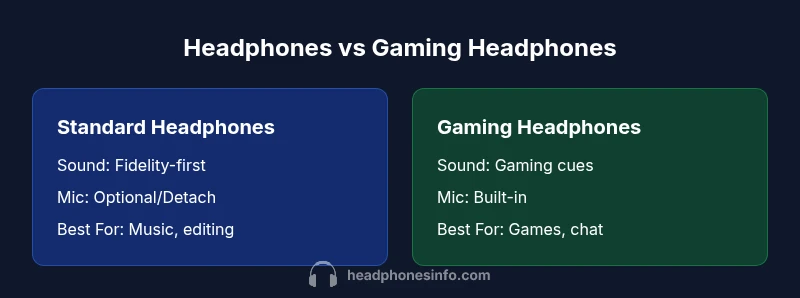
For most listeners, the key difference is that gaming headphones are optimized for immersive, latency-aware multiplayer play with a built-in mic, while standard headphones prioritize audio fidelity and comfort for music and general use. If you game online, gaming headsets offer clear chat and positional cues; for music, traditional headphones often deliver deeper detail.
What is the fundamental difference between headphones and gaming headphones?
At a high level, traditional headphones aim to reproduce sound with accuracy and balance for a wide range of content. Gaming headphones, by contrast, blend three core goals: (1) a microphone you can rely on for teammates, (2) latency-optimized drivers and codecs to keep audio in sync with your actions, and (3) spatial cues that help you locate in-game sounds. The difference between headphones and gaming headphones is most visible in intent: fidelity for listening versus integrated chat and positional awareness for gaming. According to Headphones Info, consumers should evaluate whether their priority is music quality or multiplayer performance when choosing between these two categories. In practice, many users own both styles to cover different scenarios, which is a sensible approach for enthusiasts and casual listeners alike.
Sound quality vs gaming audio cues
Sound quality matters for both categories, but the emphasis shifts. Standard headphones typically favor a flat or balanced response that preserves tonal accuracy, making them ideal for critical listening, mixing, and long sessions. Gaming headphones tend to enhance certain frequencies to emphasize footsteps, gunfire, and dialogue. They may also include virtual surround sound and software EQ that tailor the experience for gaming. The result can feel more immersive in a game, yet some models can sacrifice pure tonal neutrality in the pursuit of positional cues. When evaluating sound, compare tonal balance, soundstage width, and how natural vocals feel in music versus how clearly footsteps and gunfire translate in games.
Microphone quality and use-case implications
A built-in microphone is a defining feature of gaming headphones. For streamers and team-based games, mic clarity and noise suppression are crucial. In contrast, many music-focused headphones either omit a mic or offer a detachable mic of variable quality. If you need voice input for calls or streaming, a gaming headset often provides a convenient all-in-one solution. If you require studio-grade vocal capture, you’ll generally get better results with a dedicated external microphone paired with high-end headphones. Consider mic specs such as pickup pattern, noise cancellation, and ease of retrofitting with a separate mic when evaluating choices.
Comfort, fit, and durability for long sessions
Comfort is a top criterion for both categories, but expectations diverge. Gaming headsets often use larger cups, headbands with padding, and lightweight frames to reduce fatigue during long gaming sessions. Traditional headphones may prioritize material quality, clamping force, and driver size for extended listening without pressure points. Durability varies by model and price; braided cables, metal frames, and robust hinges tend to withstand daily wear better. If you wear glasses or use a headset for long marathons, look for memory-foam cushions, adjustable clamps, and a balanced clamping force. Try to test fit over several hours if possible.
Latency, connectivity, and the importance for gamers
Low latency is essential for gaming. Gaming headsets leverage USB, 3.5mm, or wireless protocols designed to minimize delay between your input and the audible result. Some wireless variants rely on receiver dongles or proprietary codecs, which can improve stability but may introduce pairing quirks. Traditional wired headphones generally do not include latency concerns unless used in a high-sensitivity audio workflow. Wireless gaming headphones also rely on battery life and range: plan for headroom during long sessions and charging cycles. When latency matters most, wired connections often win for consistency.
Build quality, drivers, and materials explained
Drivers are the heart of any headphone, and build quality determines how long they last under regular use. Gaming headphones frequently use larger drivers and reinforced housings to handle active gaming environments, while high-fidelity headphones emphasize driver quality that reveals subtleties in music. Materials like aluminum, magnesium, and coated cups influence durability and comfort. Open-back designs can offer wider soundstage for music but may leak sound in noisy environments, whereas closed-back designs help isolate audio in gaming or commuting. If you value portability, check weight, foldability, and included accessories such as carrying cases and replacement cables.
Price range, value, and total cost of ownership
Price is a practical consideration for most buyers. Standard headphones span a broad range—from budget models that offer decent performance to high-end audiophile pairs with premium drivers and finishes. Gaming headsets also cover a wide range: you’ll find budget options that deliver decent stereo sound and mic quality, mid-range units with better drivers and features, and premium bundles that emphasize immersive audio and robust mics. When calculating value, consider total cost of ownership: microphone quality, software features, durability, and whether you really need a built-in mic or if a separate mic would deliver better value.
How to choose based on your primary use-case
To pick the right gear, start with your primary use-case. If you game heavily and rely on coordinated voice chat, a gaming headset may be the most convenient option. If music and critical listening are your main activities, a traditional pair of headphones with a separate mic or no mic may offer superior audio fidelity. Consider the ecosystem you already own (PC, consoles, or mobile), your preferred connectivity (wired, Bluetooth, USB-C), and your tolerance for software requirements. In some cases, you may partition your setup—gaming on one headset and music on another—to maximize both experiences.
Common myths about gaming headsets debunked
Myth: Gaming headsets are universally lower in audio quality. Reality: There are models that rival high-end headphones in music clarity, though tradeoffs exist. Myth: A built-in mic always sounds worse than an external mic. Reality: Many gaming headsets offer clear vocal performance with noise suppression, though ultimate mic quality depends on the mic array and processing. Myth: You must contact-the-internet-all the time to adjust settings. Reality: Quality improvements can be achieved through straightforward EQ and built-in presets, often with minimal configuration.
How to test headphones before buying
Testing should focus on three pillars: comfort, sound signature, and mic quality (if applicable). Try wearing the headphones for at least 20–30 minutes to assess clamping pressure and heat buildup. Listen to a few tracks with a known reference recording to judge tonal balance, then switch to a game or video with spatial cues to evaluate soundstage. If possible, test mic performance in a recording app or online chat to gauge voice clarity and ambient noise handling. Request return policies and test periods to ensure you’re comfortable with your choice.
Accessories and ecosystem: DACs, amps, and microphones
A rich ecosystem can enhance both types of headphones. A DAC/AMP can improve clarity and drive for high-impedance headphones, while external mics or modular setups may yield better vocal quality. For gaming, software suites can offer spatial audio customization, noise suppression, and voice chat routing—recognize that some features may be vendor-specific. When budgeting, factor in cables, adapters, cases, and potential upgrades like a standalone USB DAC or compact amp.
Comparison
| Feature | Standard Headphones | Gaming Headphones |
|---|---|---|
| Sound quality focus | Typically neutral or balanced for wide content | Gaming-optimized with enhanced cues and potential virtual surround |
| Integrated mic | Often none or detachable mic; may require separate setup | Built-in mic designed for clear chat and streams |
| Latency optimization | Not specifically latency-focused | Latency-optimized for synchronized audio with gameplay |
| Connectivity | Wired, wireless, or both depending on model | Wired or wireless with lightweight USB dongle options |
| Best for | Music listening, editing, general use | Online gaming, team chat, streaming |
| Price range | $20-$300 | $40-$350 |
| Durability/build | Varies by model; focus on driver protection and comfort | Often bulkier; emphasis on headset durability and mic mounting |
Upsides
- Single package with built-in mic for convenience
- Often cheaper than buying separate headphones and a mic
- Easier setup for consoles and PCs
- Some models offer good game audio and chat integration
Disadvantages
- May sacrifice pure audio fidelity for chat and convenience
- Mic quality can be inferior to standalone mics at the same price
- Durability and comfort vary widely by model
- Software dependencies can complicate tweaks
Gaming headphones offer the best balance for gamers; standard headphones excel in music and critical listening.
Choose gaming headphones if you prioritize voice chat and in-game audio cues. Choose standard headphones if you value pure music fidelity and long listening comfort.
People Also Ask
What is the main difference between headphones and gaming headphones?
The main difference lies in intent: gaming headphones emphasize built-in mic, latency-optimized sound, and spatial cues, while standard headphones prioritize audio fidelity and versatility for music and general use.
The main difference is that gaming headsets focus on chat clarity and gaming cues, while regular headphones emphasize pure music-friendly sound.
Are gaming headphones worth it for PC gaming, consoles, or both?
Gaming headphones are generally worth it for both PC and console gaming, especially if you value integrated chat and simple setup. However, if you mainly play solo or consume music, a traditional headset plus a separate mic or a dedicated pair of headphones may be a better choice.
They’re usually worth it for gaming on PC or consoles if you want easy chat and setup, but for focus on music, consider separate gear.
Can I use regular headphones for gaming without a built-in mic?
Yes. You can use regular headphones with an external mic or a clip-on mic. This setup often yields better vocal quality and flexibility, though it may require more gear and a bit more setup time.
Yes—use regular headphones with a separate mic if you want better voice quality and flexibility.
Do wireless gaming headphones have latency issues?
Some wireless gaming headphones introduce slight latency depending on the protocol and USB dongle, but many modern models minimize delay to near-instant levels. Wired connections typically offer the lowest latency.
Most modern wireless gaming headsets keep latency very low, but wired is usually the safest bet for zero delay.
Should I buy a DAC/amp with my headphones?
A DAC or amp can improve sound quality and drive for high-impedance headphones, but it’s not essential for all models. If you notice dull or quiet output at typical listening volumes, a DAC/amp could help, especially with high-end gear.
A DAC/amp helps with some headphones, especially high-impedance ones, but it’s not mandatory for all setups.
What to Remember
- Define your primary use-case before buying
- Test comfort, mic quality, and latency in real scenarios
- Consider ecosystem and software features
- Weigh total cost of ownership over upfront price
- Remember: some models blur lines between categories