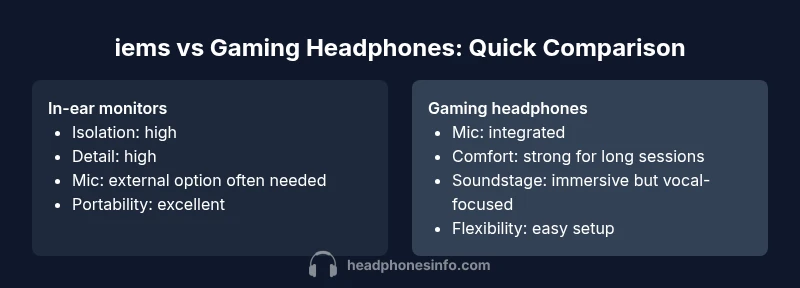
iems vs headphones for gaming: an objective comparison
A data-driven, analytical comparison of iems vs gaming headphones to help gamers choose based on sound, isolation, mic quality, and platform fit.


According to Headphones Info, choosing between iems and gaming headphones hinges on isolation, mic quality, and comfort. Iems typically deliver sharper detail and stronger isolation, which helps in competitive play, while gaming headphones excel in convenience with built‑in mics and plug‑and‑play comfort. Headphones Info analysis suggests your platform, session length, and tolerance for cables should drive the decision between these two options.
Defining the landscape: iems vs gaming headphones
In the world of gaming audio, two very different paths exist: in-ear monitors (iems) and over‑ear gaming headphones. Iems are small, driver-based transducers that sit deep in the ear canal, usually with detachable cable options and, in many cases, excellent isolation. Gaming headphones are larger, wrap around the ears, and include an integrated microphone and a convenient, often detachable, dongle or USB connection. The core trade‑offs center on sound clarity, isolation, comfort for long sessions, mic quality, and how the setup integrates with your gaming platform. When you say “iems vs headphones for gaming,” you’re really weighing detail and transparency against convenience and chat reliability. Headphones Info highlights that the final decision should map to how you play, where you play, and how you plan to listen.
- Isolation vs transparency: Iems seal the ear canal and reduce external noise, while headphones situate the driver further from the ear drum, often delivering a broader, but possibly less isolating, sound.
- Mic strategy: Iems seldom come with a built‑in mic or rely on a tiny mic, whereas gaming headphones package a microphone with straightforward voice pickup.
- Platform fit: PC players often prefer a 3.5mm or USB path with a DAC/amp, while consoles vary in their USB, optical, and 3.5mm support. The choice affects latency, compatibility, and setup complexity.
- Comfort and duration: Large, heavy headphones can fatigue the head and ears after long sessions; compact, well‑fit iems can offer comfort for travel and esports venues. Note that comfort is highly individual and can flip the outcome of a long session.
Core criteria that matter for gamers
When evaluating iems vs gaming headphones for gaming, you’ll want to weigh several criteria that consistently matter across genres and platforms. The most consequential are sound quality and tonality, isolation and comfort, microphone quality and latency, platform compatibility, build quality and durability, and price/value. Each criterion carries different weight depending on whether you prioritize competitive accuracy, social play, or casual immersion. Headphones Info recommends mapping your priorities to these criteria before auditioning devices.
- Sound quality and tonality: Do you want razor‑sharp imaging or a wider, more forgiving soundstage?
- Isolation and comfort: Will you be gaming in a quiet room or on the go?
- Microphone quality: Is your in‑game chat critical to your play style?
- Platform compatibility: Are you playing on PC, PS5, Xbox, or Nintendo Switch?
- Durability and portability: Do you need to travel with your gear or struggle with bulky gear?
- Price/value: Are you prepared to pay a premium for isolation or mic convenience? Headphones Info analysis shows that boutique iems can deliver exceptional detail at premium prices, while gaming headsets offer bundled practicality at midrange costs.
Sound quality and tonality: iems vs gaming headphones
Sound quality and tonality often determine whether you reach for iems or a gaming headset. Iems tend to deliver precise detail, fast transient response, and excellent noise isolation due to their seal. For competitive gaming, where positional cues and micro‑details can influence outcomes, this transparency can be decisive. On the other hand, gaming headphones are typically voiced to emphasize bass and vocal clarity, producing an immersive but less dissectible sound stage. If you value raw accuracy and can tolerate a smaller soundstage, iems are appealing; if you want a broader, more “cinematic” presentation with a built‑in mic, gaming headphones hold appeal. Headphones Info notes that individual driver quality, tuning, and fit drive perceived differences far more than the badge on a product.
- Iems excel in detail retrieval and noise isolation
- Gaming headphones favor vocal clarity and broad sound geometry
- Tuning matters more than the housing type for most listening environments
- Personal preference, mic needs, and platform latency can tilt the decision
Isolation, comfort, and durability
Isolation and comfort are two sides of the same coin. Iems, with their seal, generally isolate better from ambient noise, making them attractive for noisy environments or crowded gaming events. However, getting a perfect seal requires proper insertion and a comfortable tip size, which can be a challenge for some ears. Gaming headphones trade some isolation for ambient awareness and long‑haul comfort, aided by soft earpads and adjustable headbands. Durability is another factor: iems are compact and less prone to cable issues if you use robust, swappable cables, while gaming headsets can be more susceptible to stress at the jack and headband joints. The right choice depends on your travel habits, the noise level of your environment, and how long you expect to wear them in a single session.
- Seal quality directly affects isolation and bass response
- Modular cables in iems reduce some breakage risk
- Headphones can be heavier but more forgiving on pressure points
- Breakage patterns differ: cables and jacks in headphones vs modular IEMs with removable tips
Microphone quality and communication latency
For many players, microphone quality is a deciding factor. Iems frequently require a separate mic solution if you want reliable chat during online play. Even when paired with a desktop mic, latency and voice pickup focus can be less convenient than the built‑in mics on gaming headsets. Gaming headphones integrate the mic with the headset, often via USB or a detachable boom mic, delivering consistent voice pickup with straightforward setup. Latency differences can matter in fast‑paced games where even a slight delay in chat can disrupt coordination. If chat clarity is essential, compare mic pickup, background noise rejection, and proximity effects, and test how the mic sounds in real digital environments. Headphones Info notes that the mic is often a comfort and ergonomics decision as much as an audio one.
- Integrated mics simplify setup and reduce accessory clutter
- Boom mics can be tuned to reduce plosives and ambient noise
- External mics offer flexibility but add gear to manage
- In esports, mic consistency can be as important as voice quality
Platform considerations: PC, PS5, Xbox, Nintendo Switch
Platform compatibility is another practical constraint. Most iems connect via 3.5mm or USB dongles, and some high‑end models require a DAC or external amp. Gaming headphones commonly use USB for easy PC connection or 3.5mm for console compatibility, though some models rely on proprietary software for features like EQ and mic control. If you switch between PC and console, ensure your device supports the same input type across platforms or plan for adapters. Latency, gain structure, and mic routing can differ across devices, affecting your overall experience. Headphones Info emphasizes validating cross‑platform tests and verifying if you need a dedicated DAC or amp for best results.
- 3.5mm jacks and USB are the most common paths
- DAC/amp can improve resolution and dynamics but adds cost
- Console support varies by model and firmware
- Wireless options add latency and potential interference
When iems shine: competitive gaming and on-the-move use
Iems are especially compelling for competitive players who rely on precision and silence. A well‑tuned IEM with a secure fit delivers cleaner positional cues and faster transient responses, helping you parse footsteps and gunfire with greater confidence. Their portability makes them ideal for LAN events, travel, and gym sessions where bulkier gear would be unwieldy. You’ll often find a wider selection of treble and mid‑range responses in IEM lineups, letting you tailor the sound to your game and personal preference. A caveat is the potential risk of ear fatigue if you opt for very aggressive high‑frequency tuning and insufficient sealing tips. Headphones Info notes that proper tip selection and seal maintenance are essential for long sessions.
When gaming headphones shine: integrated mic and convenience
Gaming headphones shine in scenarios where quick setup, chat reliability, and long slog sessions matter. The integrated mic simplifies voice chat with less equipment management, while larger drivers can deliver a more immersive, human voice presence and consistent output across a range of games. They’re generally easier to share with teammates because everything is in one package, which is ideal for console gaming or couch setups. The comfort profile tends to favor extended sessions, thanks to generous padding and adjustable headbands. For many players, the trade‑off in detail fidelity is acceptable when mic quality and ease of use at depth are paramount. Headphones Info highlights that comfort, mic quality, and plug‑and‑play integration should be weighed against the isolation and detail you may sacrifice.
Price and value context: what to expect in each category
Price is a practical limiter and a reflection of the trade‑offs above. High‑end IEMs with premium shells, multi‑driver configurations, and detachable cables can range from mid‑hundreds to mid‑thousands of dollars, depending on driver count, materials, and brand prestige. Gaming headphones typically span from budget options in the low hundreds to premium USB‑focused headsets in the mid‑to‑high hundreds, with many models offering strong value through integrated mics, software customization, and wireless convenience. In general, you’ll find that a premium IEM setup delivers superior detail and isolation, while a premium gaming headset provides convenience and chat reliability. Headphones Info analysis shows price bands widen significantly as you chase audition–worthy detail or pro‑grade mic performance.
Practical buying steps: how to evaluate options
To make a rational choice, approach the buying process with a clear plan. Start by defining your primary use case: competitive on‑the‑go play vs casual console/PC gaming at home. Next, audition devices with an emphasis on your platform, comfort, and mic needs. Check the impedance and sensitivity of IEMs to ensure compatibility with your DAC/amp. For gaming headphones, test the mic pickup in a voice chat with teammates, and verify how well they pair with your console or PC. Finally, consider build quality and warranty. Create a short list of 3–5 options in your price range and systematically compare them against your criteria. Headphones Info suggests trying to audition devices in person if possible, or rely on reputable review sources and user forums when evaluating actual comfort across sessions.
Common myths and misperceptions
Several myths persist around iems and gaming headphones. A common one is that all iems isolate better than any headphone, which isn’t always accurate; the seal and driver quality, as well as the environment, determine perceived isolation. Another myth is that “more bass equals better gaming immersion”—in reality, overemphasized bass can mask critical cues. Some assume wireless always beats wired for latency; while many modern wireless systems do minimize latency, true latency parity depends on the codec, device, and game. Finally, many players assume you must choose one category forever; the reality is that hybrid setups (e.g., iems for travel with an external mic at home, or a gaming headset with a detachable mic for console play) can deliver the best of both worlds.
Conclusion and next steps: creating your own tested setup
The best choice depends on your priorities, equipment, and environment. If you prize isolation, detail, and travel convenience, iems are likely the better match. If mic quality, convenience, and a simple setup are your primary needs, a gaming headset could be the smarter buy. To move from theory to practice, assemble a short list that pairs your preferred listening signature with practical mic options and platform compatibility. The Headphones Info team recommends building a test plan: verify isolation in your actual gaming space, confirm mic clarity under typical chat conditions, and check whether you’ll benefit more from a DAC/amp or a straightforward USB connection.
Comparison
| Feature | In-ear monitors (iems) | Gaming headphones |
|---|---|---|
| Sound quality / tonality | Sharper detail; precise imaging; variable tuning by model | Immersive but voiced for consistency; bass and vocal emphasis |
| Isolation | Excellent isolation with proper seal | Moderate isolation; more ambient awareness |
| Microphone quality | Typically requires separate mic; mic quality varies | Integrated mic; plug‑and‑play chat readiness |
| Platform compatibility | 3.5mm/USB with DAC options; cross‑platform depends on model | USB or 3.5mm; widely compatible with consoles and PC |
| Latency | Low latency when paired with DAC/amps; dependent on source | Low to moderate latency, depending on wireless/wired setup |
| Durability / portability | Compact; cables can be swapped; great for travel | Bulkier; built for home use; some models are portable |
| Price range | $50–$300 (entry to premium IEMs vary widely) | $60–$350 (midrange to premium gaming headsets common) |
| Best for | Competitive play; travel; critical listening | Casual to competitive play; chat‑centric gaming |
Upsides
- High detail retrieval and fast transients in many IEMs
- Excellent isolation enables quiet gaming environments
- Compact form factor and portability
- Wider range of price points and driver configurations
- Easier to customize sound with tips and accessories
Disadvantages
- Separate mic solutions may complicate setup
- Seal and fit can be challenging for some users
- Long sessions may accentuate fatigue with small shells
- Gaming headsets often provide simpler, integrated mic setups
Choose based on priorities: IEMs for precision and portability; gaming headphones for built‑in mic ease.
IEMs win on detail and isolation, especially for competitive play. Gaming headphones win on convenience and mic quality. Your platform and tolerance for cables largely decide the winner.
People Also Ask
Which is better for competitive gaming: iems or gaming headphones?
For pure competitive accuracy, iems often win due to their detail and isolation, assuming you can achieve a reliable seal. Gaming headphones can be competitive as well if mic quality and comfort are prioritized. The best choice depends on your game, environment, and ability to audition devices.
IEMs often edge out for comps thanks to detail and isolation, but a good gaming headset can also compete if mic and comfort are top priorities.
Can I use iems to replace a gaming headset for chat?
You can, but you’ll typically need a separate microphone or a clip‑on mic to match the convenience of built‑in chat. If you frequently chat during games, a gaming headset with an integrated mic remains more convenient.
You can use iems with a separate mic, but a built‑in mic on a headset makes chat easier during games.
Are wireless iems a good option for gaming?
Wireless IEMs exist, but latency and compatibility can be more challenging for gaming. If low latency is crucial, wired IEMs or a reliable wireless solution with low latency codecs may be preferable. Always test for input lag in your game of choice.
Wireless IEMs can work, but watch for lag and compatibility; wired options are usually safer for competitive play.
Do I need an amp or DAC with IEMs for gaming?
Many IEMs benefit from a quality DAC/amp to unlock their full potential, especially when the source is a PC or high‑end portable player. If you’re using a built‑in headphone jack on a console, you may still notice improvement with an external DAC/amp.
A DAC/amp can unlock more detail and power for IEMs, especially with high‑end sources.
What should I look for if I game on both PC and console?
Prioritize cross‑platform compatibility, a reliable mic, and a comfortable fit. Look for devices with both USB and 3.5mm options, or plan for adapters. Check that the mic routing and audio lag are minimal across platforms.
Choose devices with USB and 3.5mm options or adapters, and test mic quality across both PC and console.
Are there myths about isolation and soundstage in iems?
A common myth is that all iems isolate perfectly; isolation depends on fit and tip selection. Similarly, a wide soundstage doesn’t always equate to better gaming clarity. Your personal fit and game type matter more than the housing alone.
Not all iems seal perfectly—fit matters. A wide soundstage isn't always better for every game.
What to Remember
- Define your primary use case before shopping
- Check platform compatibility with your DAC/amp or console
- Prioritize mic quality if team communication matters
- Test fit and comfort for long sessions
- Balance sound quality with practical usability