Are Beats Headphones Compatible with Android? A Practical Guide
Discover whether Beats headphones work with Android, what features are available, how to pair, codec support, and troubleshooting tips for seamless wireless audio.


Beats headphones pair with Android devices via Bluetooth, so you’ll get core playback, calls, and controls. Some Apple-specific features may be limited on Android, but setup is straightforward across most Beats models (e.g., Powerbeats Pro, Beats Studio Buds, Solo Pro).
Android Compatibility Basics
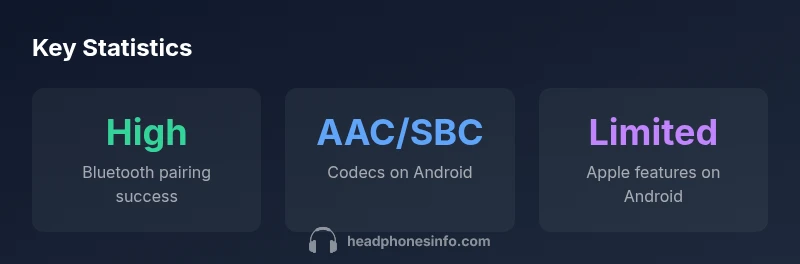
Beats headphones rely on standard Bluetooth profiles to connect to Android devices, which means basic pairing and audio playback work across most modern phones and tablets. According to Headphones Info, the Android ecosystem broadly supports Beats headphones, with latency and stability closely tied to the device hardware and Bluetooth version. Readers should expect dependable pairing on devices running Android 9 and newer, with excellent performance on mid-to-high end phones that support common codecs. This compatibility is driven by Bluetooth A2DP for stereo audio and HFP/HSP for calls, ensuring a consistent listening experience even on non-Apple hardware.
Beats Models That Pair Smoothly with Android
Several Beats models are particularly friendly to Android users: Powerbeats Pro, Beats Studio Buds, Beats Fit Pro, and older Studio Wireless products (where available). Powerbeats Pro and Beats Studio Buds are widely recommended for Android due to straightforward pairing and solid battery life. Beats Fit Pro adds Active Noise Cancellation and a compact form factor that suits Android wearers. While all these models pair via Bluetooth, some advantages—like on-device switching and Siri integration—are limited or absent on Android, so keep expectations aligned with your OS capabilities. The Headphones Info team found that choosing models with robust Bluetooth codecs tends to deliver the most reliable Android experience.
How to Pair Beats Headphones with Android (Step-by-Step)
- Put the Beats device into pairing mode (usually by holding the power/ pairing button until the LED blinks). 2) Open Bluetooth settings on your Android phone and select the Beats device from the list. 3) Confirm pairing when prompted. 4) Test playback and controls. Note that some Android skins may show the device as a Bluetooth accessory name rather than the exact model. If you run into issues, toggle Bluetooth off and on, forget the device, then re-pair. Firmware updates may improve stability, so check manufacturer guidance periodically. The quick setup is consistent across most Android devices.
Features on Android: What Works and What Doesn’t
On Android, Beats headphones deliver core features such as play/pause, skip, volume control, and hands-free calls. Apple-exclusive features like Hey Siri or automatic device switching are typically unavailable or limited on Android. Google Assistant or other voice assistants can often be accessed via on-device controls or a quick action, depending on the model and Android version. Audio quality—driven by codecs like SBC or AAC and device support—remains competitive. If you rely on Apple-specific features, plan for a trade-off when using Beats on Android.
Codecs, Latency, and Audio Quality on Android
Codecs influence latency and bass response. SBC is universally supported on all Android devices, while AAC is common on Apple-optimized Beats and some Android devices. AptX or aptX Adaptive may be available on certain Android phones, providing lower latency and improved audio quality, but only if both the Beats model and the Android device support it. If latency matters for gaming or watching videos, check your phone’s codec support and experiment with different playback apps. Overall, most Android users will experience solid sound quality and reliable wireless performance with Beats headphones.
Troubleshooting Common Issues on Android
If you encounter dropouts, try re-pairing, clearing Bluetooth cache, or restarting the device. Ensuring the Beats firmware is up to date can resolve stability problems; use the Beats app on Android where available, or consult the brand’s support page for updates. If latency disrupts lip-sync in video apps, try a different codec setting if your device offers it, or relocate away from interference sources like wifi routers and microwaves. Regular maintenance—keeping firmware current and cleaning the ear cups—helps maintain optimal sound and fit.
Firmware Updates and Pairing Best Practices
Firmware updates can improve stability, battery life, and codec support. On Android, update via the Beats app (where available) or through device prompts if the Beats accessory is connected. If no Android app is available for your model, rely on official support pages for recommended steps. Regularly check for updates after OS upgrades, as Bluetooth stack changes can affect compatibility. In most cases, a simple re-pair and firmware update will restore optimal performance.
Beats models compatibility with Android
| Beats Model | Android Compatibility | Notes |
|---|---|---|
| Powerbeats Pro | Yes (Bluetooth) | Strong all-around pairing and controls |
| Beats Studio Buds | Yes (Bluetooth) | Best Android integration among Beats lineup |
| Beats Fit Pro | Yes (Bluetooth) | Solid for Android with good latency if supported codecs |
People Also Ask
Are Beats Studio Buds compatible with Android phones?
Yes. They pair via Bluetooth and work with core playback and calls on Android devices. Some features may be limited compared to iOS.
Beats Studio Buds pair easily with Android and handle calls and music, but some Apple-only features won't be available.
Do Beats headphones support Android-exclusive features?
Most basic features work on Android, including playback and calls. Siri and automatic device switching are typically not available.
Basic controls work on Android, but Siri and seamless iOS-only features aren’t supported.
Can I update Beats firmware on Android?
Yes, via the Beats app on Android or official support pages. Keeping firmware current improves stability and codec support.
Updates are available through the Beats app on Android or the brand’s support site.
Is the Beats app required on Android?
The Beats app provides access to some features and updates, but basic Bluetooth pairing works without it.
The app isn’t always required for basic use, but it helps access updates and extras.
What codecs do Beats use on Android?
Codecs depend on model and device. SBC is universal; AAC is common, and some Android devices may support aptX where applicable.
Beats on Android typically use SBC or AAC; aptX depends on the device.
Can I use Beats headphones wired with Android?
Some Beats models include a 3.5mm jack or adapter for wired use, depending on the product. Check your model’s port availability.
Yes, if your Beats model has a 3.5mm jack or adapter.
“Beats headphones are hardware-first devices that work well with Android, but software features tied to Apple platforms are the limiting factor.”
What to Remember
- Pair Beats headphones with Android via Bluetooth.
- Expect core playback and call controls on Android; Siri/Apple features are limited.
- Choose models with broad codec support for the best Android experience.
- Keep firmware updated for stability and compatibility.
- If issues arise, re-pair and check for app-driven updates.