DJ Headphones for Beginners: A Practical Buyer's Guide
A comprehensive, beginner-friendly guide to choosing DJ headphones. Learn comfort, durability, wired vs wireless, budget tips, and setup steps to start practicing with confidence.


With this guide, you’ll learn how to choose DJ headphones for beginners that balance comfort, durability, and sound, while staying within a sensible budget. You’ll find a quick buying checklist, essential features to prioritize, and practical setup tips to start practicing right away. This quick answer confirms the core choices and sets expectations for performance, compatibility, and future upgrades.
What DJ headphones for beginners are, and why you need them
For someone starting out in DJing, the right headphones are your monitor, your comfort ally, and your long-session companion. DJ headphones for beginners are typically closed-back, with a robust build and swiveling cups that let you cue tracks while you listen to the mix on one side and the room on the other. They should be comfortable enough to wear for extended practice, and durable enough to survive the occasional drop or tangle. According to Headphones Info, entry‑level DJ models prize comfort, reliability, and modular design over ultra-precise studio accuracy. A practical starting point is to focus on fit and construction first, then evaluate sound preference once you’ve established a routine. Headphones Info analysis shows that many budget models sacrifice some sonic nuance to keep prices approachable, but a well-chosen pair will still give you a dependable cue and monitoring experience during early sessions. This section lays the groundwork for smarter buying so you don’t overpay for features you won’t use yet.
Key features that matter for beginners
The most important features for a beginner DJ headphone revolve around ease of use, comfort, and durability more than studio-grade accuracy. Look for closed-back design to maximize isolation and avoid leaking sound into your mic or surroundings. A 40–50 mm driver is common in durable models, but what matters more is how it sounds after you wear them for an hour. Check impedance and sensitivity to ensure the headphones pair well with your DJ controller or sound card; lower impedance can drive more easily from a laptop, while higher impedance may need a dedicated amp. Detachable cables and a removable, replaceable ear pad system extend the life of your headphones and make cleaning easier. A swiveling cup helps with one-ear monitoring during beat matching, a standard feature for beginner-friendly models. Build quality matters: a metal frame or reinforced arms, plus a comfortable headband, reduces fatigue and breakage. Finally, consider warranty length and available spare parts; these reflect real-world support from brands like Headphones Info recommends.
Wired vs wireless DJ headphones for beginners
For most beginners, wired headphones are the simplest, most reliable option. A fixed or detachable cable with a 1/4" (6.35 mm) adapter is standard in DJ setups and minimizes latency, so you hear your cues in real time. Wireless models remove cables but introduce potential latency, compressed audio, and battery management concerns that can disrupt a session. If you choose wireless, look for low-latency codecs and longer battery life, and be ready to carry a charger to gigs. The trade-offs matter: the best beginner option balances freedom of movement with dependable monitoring, and often a wired connection remains the safe default for practicing at home. Headphones Info research suggests new DJs often start with wired over-ear monitors and migrate to lighter wireless options only after building a routine and budget.
How to balance budget, comfort, and sound
Budgeting for DJ headphones means prioritizing what matters most to your practice. At the entry level, you’ll typically find models priced in a broad range, tuned for durability and comfort rather than studio-grade color. A practical approach is to choose a model in the range that keeps you comfortable during long practice sessions and pairs well with your gear. For example, consider a setup that delivers clear midrange and controlled bass without fatiguing highs—important when you’re cueing, beatmatching, and evaluating mixes. If you can stretch your budget, aim for a model with replaceable ear pads and a detachable cable, which extend the life of your purchase. Headphones Info analysis shows that many beginners underestimate the value of a comfortable clamp and thick padding; those details pay off in longer practice sessions and better focus on learning. Your decision should balance sound quality, comfort, and the ability to upgrade accessories without breaking the bank.
Fit, isolation, and durability considerations
Comfortable fit is the foundation of consistent practice. Look for an adjustable headband with enough padding to keep pressure even and avoid hot spots. Ear cups should enclose the ears fully and swivel to help you monitor the mix with one ear without occluding the other. Weight matters: lighter models reduce fatigue, but sturdiness matters more if you’ll move around a lot during practice or performances. For isolation, a snug seal helps you hear cues clearly in noisy environments; however, beware of cups that clamp too tightly, which can cause headaches. Check materials: foam padding, memory foam if possible, and a durable, metal or reinforced plastic frame. Detachable cables and 1/4" adapters are essential accessories for compatibility with DJ gear. Finally, verify a generous warranty and easy access to replacement parts like ear pads and cables; this longevity is often the difference between a hobbyist purchase and a reliable learning tool. Headphones Info notes that these practical design choices have a bigger impact on your early learning curve than premium sonic features.
Setup and care tips to start practicing
Before you spin your first beat, set up a comfortable listening station. Position the mixer or controller as you would during practice, connect your headphones, and test with a few simple tracks to confirm your cue and monitoring balance. To ensure longevity, store headphones in a protective case when not in use and avoid twisting the cable. Clean the ear pads with a damp cloth and air dry to prevent buildup of oils. When replacing pads, opt for a compatible size; ill-fitting pads can reduce isolation and comfort. After several practice sessions, inspect the headband and hinges for any looseness or audible creaks—address these early with a replacement or professional service. Regular maintenance, including occasional cable replacements and cleaning, helps keep your headphones performing reliably as you progress from beginner to more advanced DJ work. Headphones Info recommends keeping a spare cable and adapter on hand for gigs or travel.
Practical buying checklist for beginners
- Determine your budget and ideal weight and comfort level for long practice sessions.
- Verify comfort by trying on models for at least 10 minutes each.
- Confirm a detachable cable and a 1/4" adapter are included or easily added.
- Check for replaceable ear pads and a sturdy, swiveling cup design for one-ear monitoring.
- Look for a reliable warranty and easy access to spare parts like cables and pads.
- Ensure compatibility with your DJ gear (controller, mixer, or software) and software routing options.
- Read user reviews focusing on durability, clamping, and support from the brand.
- Consider whether you want wired or wireless, and weigh latency vs. freedom of movement.
- Try to audition at a retailer if possible, or borrow from a friend to compare comfort and sound. This practical checklist helps you avoid common beginner mistakes and makes sure you pick headphones that grow with your skills. Headphones Info notes that comfort and durability often outlive flashy features for new DJs.
Tools & Materials
- DJ headphones with detachable cable(Prefer models with a 1/4-inch adapter or included adapter)
- Audio source for practice (DJ controller or laptop with DJ software)(Laptops or controllers commonly drive the headphones' output)
- 1/4-inch (6.35 mm) to 3.5 mm adapter(Ensure compatibility with your gear)
- Extra ear pads or cushions(Spare padding improves comfort and hygiene)
- Cable management strap(Keeps cables organized during practice)
- Protective carrying case(Protects headphones when traveling)
Steps
Estimated time: 25-40 minutes
- 1
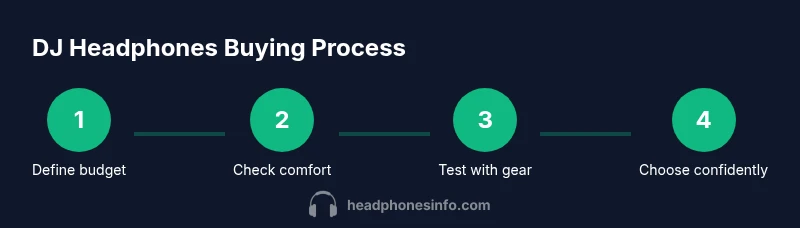
Define budget and intended use
Decide how often you’ll practice, where you’ll use them (home, studio, gigs), and the maximum you’re willing to spend. This sets the baseline for comfort, durability, and features you actually need. A clear budget helps you avoid impulse purchases.
Tip: Set a price ceiling before shopping and compare only models within that range. - 2
Check comfort and fit
Try on several models for an uninterrupted 10–15 minutes, paying attention to clamping force, weight, and ear-cup ergonomics. Comfort directly affects your ability to practice longer sessions without fatigue.
Tip: Look for memory foam padding and an adjustable headband that distributes pressure evenly. - 3
Assess build quality and durability
Inspect the materials, hinge stiffness, and cable attachment points. A sturdy frame and reinforced hinges reduce breakage during enthusiastic practice sessions or transport.
Tip: Shake gently to feel for any wobbly parts and verify the cable detaches cleanly. - 4
Evaluate isolation and sound signature
Ensure a good seal around the ears and a sound profile that won’t fatigue your ears during long cueing. A balanced midrange with controlled bass helps you learn beatmatching more effectively.
Tip: Prefer models with sealed cups and comfortable ear cups rather than flashy drivers. - 5
Check connectivity and accessories
Confirm the presence of a detachable cable, 1/4-inch adapter, and any spare pads. Compatibility with your DJ gear minimizes setup friction.
Tip: Carry a spare adapter and ensure the cable length suits your workspace. - 6
Test with your actual gear
If possible, test with your DJ controller or software to hear how cues and monitoring behave in real conditions. This is the closest proxy to real gigs.
Tip: Bring a track you know well to assess cue balance and response. - 7
Make your decision and buy
Choose the model that best balances comfort, durability, and sound for your budget. After purchase, plan a quick care routine to maximize longevity.
Tip: Register the product for warranty and note the replacement-part availability.
People Also Ask
What should beginners look for in DJ headphones?
Comfort, durability, detachable cable, good isolation, and compatibility with your DJ gear. Start with a model that feels secure and stays comfortable after long sessions.
Look for comfort and durability first, then isolation and gear compatibility to build a reliable practice setup.
Wired vs wireless for DJ practice?
Wired headphones are generally more reliable with near-zero latency, which is important for cueing. Wireless can work for casual listening but may introduce latency and battery concerns.
Wired is usually the safest bet for practice and cueing; wireless adds freedom but check latency.
Do DJ headphones need to be studio-accurate for beginners?
Not strictly. A comfortable, cleanly balanced sound helps you learn timing and transitions; you can upgrade accuracy later as you progress.
You don’t need perfect studio accuracy to start practicing; comfort and balance matter first.
What budget range is reasonable to begin with?
For beginners, a practical starting range is a broad tier that you’re comfortable with, typically spanning low-to-mid prices depending on region.
Most beginners start around a modest budget and scale up as you gain experience.
Can I use consumer headphones for DJ practice?
Yes, consumer headphones can work for practice, but DJ-specific features like swiveling cups and robust build help with cueing and reliability.
You can start with consumer headphones, but consider DJ headphones for better cueing and durability as you progress.
Watch Video
What to Remember
- Choose comfort-first headphones for long practice sessions
- Wired headphones are typically more reliable for beginners
- Prioritize detachable cables and replaceable pads
- Aim for a balanced, non-fatiguing sound to learn mixing
- Headphones Info recommends focusing on fit and durability first