How to Stop Headphones from Pausing Music
A practical, step-by-step guide to stop headphones from pausing music unexpectedly. Learn causes, quick fixes, settings to adjust, firmware updates, and how to test across devices for reliable playback.


If your goal is how to stop headphones from pausing music, start with the simplest fixes: check for auto-pause or tap controls, restart the playback app, and re-pair your Bluetooth device. Then dive into firmware updates and app permissions. This quick guide helps you reduce pauses across wired and wireless headphones, with a focus on settings, software, and hardware checks.
Why headphones pause music
Headphones pause music for a variety of reasons, including gesture controls, auto-pause features, and how your device handles playback focus. Proximity sensors, accidental taps, and cross-app interactions can trigger pauses even when you don’t intend to pause. Understanding these common culprits is the first step in learning how to stop headphones from pausing music. Headphones Info analysis notes that many pauses happen due to software interactions rather than a single hardware fault, so we’ll emphasize settings and updates first.
In short, pauses are often a symptom of how your headphones and source device communicate. When you see a pause, ask: did I accidentally tap the ear cup, is auto-pause enabled, or did the OS switch playback to another app? Answering these questions helps you target the right fix without unnecessary resets.
Quick fixes you can try before diving deeper
Start with fast checks that don’t require deep configuration. Ensure the headphone fit is secure, the device isn’t in a pocket or bag where sensors misread, and the playback app is not frozen. If pauses occur with a single app, check that app’s permissions and any built-in power-saving features. These quick fixes are often enough to stop pauses from happening without touching the hardware.
If you notice the pause occurs only on one device, focus on that device’s Bluetooth settings and OS energy-saving rules. Small changes like preventing the device from pausing when switching apps can make a big difference in how reliably audio plays. These steps form the practical base for solving how to stop headphones from pausing music in everyday use.
Dive into controls: auto-pause, gestures, and taps
Many modern headphones expose toggles for auto-pause, tap-to-pause, and gesture control. Open the headphone companion app or the device’s Bluetooth settings and locate options such as auto-pause, tap-to-pause, and gesture controls. Disable auto-pause or turn off unintended gestures to reduce spontaneous pauses. If your model uses wear-detection or proximity features, adjust their sensitivity or disable them if they cause missed playback. This targeted, feature-by-feature approach is essential when learning how to stop headphones from pausing music.
Note that some devices may synchronize these settings with iOS or Android media controls, so it’s worth checking OS-level playback settings as well as the headphone app. In many cases, turning off gesture controls while listening during physical activity yields the most stable playback.
Firmware and app updates: keep your gear compatible
Software faults can continue to cause pauses if you skip updates. Check for firmware updates for your headphones, and for any companion apps on your phone or computer. Install the latest versions, then re-pair the device if required by the update process. Firmware updates often fix erratic playback behavior and improve compatibility with newer OS versions. Headphones Info Analysis, 2026, emphasizes keeping both headphones and apps current to minimize pauses.
Test across devices to isolate the issue
To determine whether the problem lies with the headphones or the source device, test with a second phone, tablet, or computer. Try multiple music apps and streaming services to see if pauses occur consistently. If the pause disappears on one device but not another, focus your debugging on that device’s Bluetooth stack, battery management, or OS settings. This cross-device testing is a powerful way to narrow down causes and confirm a solution for how to stop headphones from pausing music.
Is it hardware or software? troubleshooting worn sensors and buttons
If software fixes fail, hardware wear may be the culprit. Inspect wear-sensitive areas like touch sensors, buttons, and contact points for dirt, moisture, or wear. Clean according to the user manual, and avoid liquids that can damage electronics. If you suspect a faulty sensor or button, contact the manufacturer’s support for guidance on repair or warranty options. By isolating hardware from software, you gain a clearer path to solving pauses and maintaining consistent playback.
Final checks and getting help
After applying settings, firmware updates, and potential hardware checks, perform a final playback test across a few devices and apps. If pauses persist, gather information such as model, firmware version, OS version, and steps that reliably reproduce the pause. Share these details with customer support to expedite assistance. Following a structured approach will improve both your experience and the odds of a quick resolution.
Tools & Materials
- Headphones (your model)(Have them on hand for testing and pairing)
- Smartphone or computer(Source device for settings and testing across apps)
- Headphone companion app or user manual(Access auto-pause, tap controls, and wear-detection settings)
- USB-C/Lightning charging cable(Ensure devices have sufficient power during updates)
- Firmware update file or app from manufacturer(Optional, used if updates aren’t automatic)
- Bluetooth settings access( needed on the source device)
Steps
Estimated time: 20-40 minutes
- 1
Open headphone settings
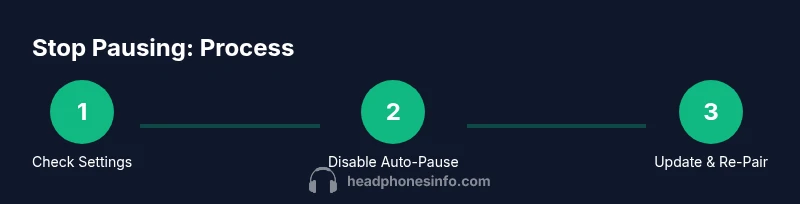
Open the headphone companion app or the Bluetooth settings on your source device. Locate controls for auto-pause, tap-to-pause, and gesture sensitivity. This step establishes where pauses are managed so you can disable problematic features.
Tip: Take 30 seconds to skim all relevant sections to avoid missing a toggle that causes pauses. - 2
Disable auto-pause and unintended gestures
Turn off auto-pause, tap-to-pause, and any gesture controls that could trigger a pause. Save changes and test playback with a quick song to verify if the pause still happens.
Tip: If you can’t find the exact switch, try toggling nearby related features; some models group controls differently. - 3
Re-pair the device if prompted
If the update or settings require it, remove the headphone from the Bluetooth pairing list and re-pair it. A clean pairing often resolves sporadic pauses caused by connection handoffs.
Tip: After re-pairing, perform a short test with two different apps to confirm stability. - 4
Check for firmware/app updates
Check for available firmware for your headphones and updates for any companion apps. Install updates, then restart devices and test playback again.
Tip: Updates can fix known bugs that cause pauses across devices. - 5
Test with a second device
Pair your headphones with a second phone or computer and test across multiple apps. If the pause disappears on the second device, the issue is likely OS or device-specific.
Tip: Document any OS-level power-saving or Bluetooth settings that differ between devices. - 6
Inspect hardware and prepare to contact support
If pauses persist, inspect for wear on sensors or buttons and consider a factory reset as a last resort. If that fails, gather model, firmware, and steps to reproduce for support.
Tip: Factory resets erase pairing history; back up settings where possible before proceeding.
People Also Ask
Why do my headphones pause music randomly?
Pauses are often caused by auto-pause features, tap/gesture controls, or OS/app interactions. Hardware wear or faulty sensors can also trigger pauses under certain conditions.
Pauses usually come from settings or software interactions, but wear or sensor faults can also cause pauses.
How do I disable auto-pause on wireless headphones?
Open the headphone app or Bluetooth settings, locate auto-pause or wear-detection options, and turn them off. Re-test playback across apps to confirm the fix.
Go into settings, turn off auto-pause, and test playback to confirm.
Why does pausing occur with only one app?
Some apps have their own playback rules or power-saving modes that can pause music independently of the device settings. Check that app’s permissions and energy settings.
It's often app-specific behavior; check app settings and permissions.
Will updating firmware fix pausing?
Firmware updates fix known bugs and improve compatibility with OS versions, which can reduce or eliminate pauses. Always install the latest official release.
Yes, updating firmware can fix pauses caused by bugs.
Is a factory reset worth it for pausing issues?
Only after other fixes fail. A factory reset restores default settings but will erase pairing history and customizations.
A factory reset can help if other steps don’t work, but back up first.
When should I contact support?
If pauses persist after firmware updates and tried steps, contact the manufacturer with model, firmware, and steps to reproduce. Hardware wear may require professional service.
If the problem persists after updates, reach out to support with details.
Watch Video
What to Remember
- Identify whether auto-pause or gestures cause pauses
- Disable problematic controls in both headphone app and OS settings
- Keep firmware and apps updated to reduce playback glitches
- Test across multiple devices to pinpoint source of the pause
- Reach out to support if hardware wear is suspected