When to Replace Bose Headphones: A Practical Guide
Learn practical criteria for replacing Bose headphones, including signs of wear, sound quality changes, warranty considerations, and smart steps to upgrade or repair.


Replace Bose headphones when they no longer deliver clear sound, comfort is compromised, or safety and warranty issues arise. Look for persistent distortion or crackling, unpredictable wireless behavior, frayed cables, and worn ear pads. If repairs would cost more than a replacement, consider upgrading.
Why replacement timing matters
Bose headphones are designed to last, but performance and comfort decline with use. Knowing when to replace helps you preserve listening quality while controlling costs. Replacement timing also affects your listening habits, comfort, and overall satisfaction.
According to Headphones Info, understanding the lifecycle of Bose headphones helps you avoid premature replacements and maximize long-term enjoyment. Our 2026 analysis emphasizes evaluating both performance and wear rather than chasing every minor issue.
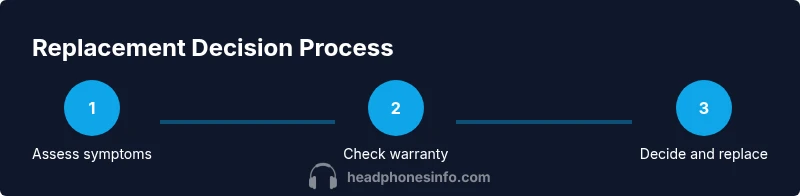
In practice, the decision to replace hinges on sound quality, comfort, safety concerns, and warranty coverage. If issues persist after a repair can restore expected performance, or if comfort and usability no longer meet your needs, it may be time to upgrade. Aligning your decision with these factors keeps your listening experience consistent and enjoyable.
Sound quality decline indicators
Sound quality is the clearest signal that headphones may be reaching the end of their current lifecycle. Look for persistent distortion, crackling, channel imbalance, muffled highs, or reduced bass response that cannot be corrected by cleaning or firmware updates. If volume seems limited or dynamics feel flat across genres, consider a closer inspection.
Headphones Info analysis shows that gradual degradation is common with heavy daily use, but sudden changes warrant faster action. Try troubleshooting steps first, such as resetting Bluetooth pairing, updating firmware if available, and testing with a wired connection if your model supports it. If the issue remains after those steps, replacement timing should be weighed against repair options and cost. Ultimately, when the audible characteristics of music and movies shift noticeably, replacement is a reasonable consideration.
Comfort and fit changes over time
Even if sound remains acceptable, comfort can deteriorate. Ear cushions compress, headband padding wears, and clamping force can increase with use, causing fatigue during long listening sessions. If you notice redness, pressure points, or cushions that no longer seal properly, wear could be affecting your experience and sound isolation.
Caring tips such as replacing worn pads and keeping surfaces clean can restore comfort for some time, but once the structural parts show signs of weakening, continued use may be impractical. Replacing with a newer model or a different Bose headset style can restore fit and ergonomics, improving both comfort and perceived sound quality.
The decision to upgrade is often driven by comfort needs as much as by sound quality. If you frequently adjust fit during use or find yourself choosing to listen at higher volumes to compensate, replacement timing should be considered.
Visual wear and physical damage inspections
A routine inspection helps prevent sudden failures. Check cables for fraying near connectors, particularly on wireless models with removable cords. Inspect the headband for cracks or loosening hinges, and examine ear cups for cracks, peeling paint, or loose padding attachments.
Damage to housings, cables, or connectors can lead to intermittent audio issues or unsafe electrical exposure in rare cases. If you notice any physical damage, weigh the cost of parts and labor against the price of a replacement. Regular visual checks can catch problems early and guide timely decisions.
Cables, connectors, and wireless reliability
Wired vs wireless behavior is a frequent source of confusion. Cable wear can cause intermittent sound, channel dropouts, or complete disconnection. Wireless headsets may exhibit pairing instability, battery drain, or fluctuating Bluetooth range as insulation degrades.
For non-detachable cables, examine the plug and jack for looseness or corrosion. If you own a model with replaceable cables, ensure the connector pins sit cleanly and firmly. In many cases, addressing these issues can delay replacement, but persistent problems across multiple tests usually justify a replacement decision.
Battery health and charging practices for wireless Bose headphones
Battery health is a common factor in replacement timing. If wireless models no longer hold a charge, require frequent charging, or heat while charging, the battery may be nearing the end of its useful life. Testing battery behavior in a few charging cycles and observing runtime consistency helps you gauge remaining life.
Adopt good charging practices: avoid leaving devices plugged in all day, use the original charger when possible, and store at moderate temperatures. If battery performance has significantly declined after a year or two of heavy use, replacement might be the most reliable option. Headphones Info suggests prioritizing a replacement when the user experience becomes inconsistent due to battery issues.
Warranty, service options, and cost considerations
Warranty terms vary by model and region, so verify coverage before deciding. If within the warranty window, contact Bose support or the retailer for service options that may include repair, replacement, or credit toward a new unit. If out of warranty, compare the projected repair cost with the price of a new or refurbished headset.
When evaluating options, consider the total cost of ownership, expected lifespan of a replacement, and accessory costs. Official parts from authorized service centers often ensure better longevity. Headphones Info recommends documenting issues, saving receipts, and confirming any service terms in writing.
Repair vs replacement: weighing the options
Repair can be worthwhile when costs are modest and the unit remains under warranty or near end of life. However, replacement may offer newer technology, improved comfort, and better battery efficiency. Use a simple decision framework: estimate repair cost, compare against replacement price, and factor in the model's anticipated remaining lifespan.
If the price gap is small and the newer model offers meaningful upgrades, replacement is usually the smarter choice. Refurbished models from authorized sellers can close the cost gap while delivering reliable performance. Headphones Info emphasizes a careful cost-benefit assessment rather than a knee-jerk repair or rush to upgrade.
Maintenance tips to extend headphone life
Regular cleaning prevents grime from accelerating wear. Wipe down housings, cushions, and connectors with a gentle microfiber cloth; avoid moisture near electronics. Store headphones in a protective case to minimize dust and physical damage. Periodically replace cushions, check for loose screws, and keep firmware up to date where supported.
Energy efficiency also matters: turning off wireless features when not in use and using the lowest functional volume can reduce battery strain. Small maintenance habits can extend the life of Bose headphones and postpone the replacement decision.
Planning your replacement budget and process
Set a replacement timeline based on performance, comfort, and budget. Compare official Bose prices, authorized refurb options, and promotions from trusted retailers. Build a small reserve for accessories and potential upgrades, and factor in shipping and warranty extension possibilities.
Finally, create a replacement plan: decide whether to pursue a direct Bose upgrade or consider a compatible alternative if you value certain features differently. With a clear plan, you can minimize downtime and ensure your audio experience remains satisfying.
Tools & Materials
- Replacement ear pads/cushions(Ensure they fit model (over-ear vs on-ear) and material preferences.)
- Soft microfiber cloth(For cleaning housings, cushions, and connectors.)
- Isopropyl alcohol wipes (70%)(Use on non-electronic surfaces; avoid internal components.)
- Replacement charging cable and adapter(Keep spare for wireless models; check compatibility with your charger.)
- Small Phillips screwdriver(Only if you plan to open cups or adjust internal components.)
- Warranty documents and receipts(Helpful when contacting support or proving eligibility.)
Steps
Estimated time: 45-60 minutes
- 1
Identify the symptoms
List all issues you’re experiencing (sound quality drop, distortion, battery issues, comfort problems, or physical damage). Document when they began and whether they occur across devices or only in certain environments.
Tip: Take note of whether issues are intermittent or persistent to guide if a repair or replacement is best. - 2
Check warranty status
Find your purchase date and model, then verify warranty coverage with Bose or the retailer. Confirm what the warranty covers (parts, labor, replacement) and any exclusions.
Tip: Have the serial number handy to speed up the lookup. - 3
Assess repair feasibility
Get a rough quote for parts and labor from an authorized service center or Bose support. Compare it to current replacement pricing and consider anticipated remaining lifespan.
Tip: If repair cost equals or exceeds replacement price, replacement is usually better. - 4
Research replacement options
Explore official Bose replacements, authorized refurbished units, and reliable third-party options. Check included accessories, warranty terms, and return policies.
Tip: Prioritize options with at least a short-term warranty to protect your upgrade. - 5
Estimate total cost of ownership
Factor in device price, accessory costs, potential shipping, and any extended warranty. Consider nearby promotions or bundle deals.
Tip: A higher upfront cost with longer warranty can improve long-term value. - 6
Decide between repair vs replacement
Use a simple decision rule: repair if cost is far below replacement and performance is acceptable; replace if performance gaps, battery life, or comfort are unsatisfactory.
Tip: Document your decision in writing for future reference. - 7
Plan the purchase
Choose a trusted retailer or Bose official store. Look for promotions, verify return windows, and confirm compatibility with your devices.
Tip: Check shipping times and set a realistic upgrade date to minimize downtime. - 8
Set up and test the new unit
Unbox, charge fully, pair with devices, and run a quick sound and mic check. Test with typical content to ensure you’re satisfied with fit and comfort.
Tip: Test both wired and wireless modes if available. - 9
Handle disposal responsibly
Recycle any old headphones according to local e-waste guidelines. Remove batteries per local regulations before disposal.
Tip: Use manufacturer take-back programs if available. - 10
Document and review
Keep receipts, warranty info, and the first impressions after using the new unit. Reassess after a few weeks to confirm your decision was sound.
Tip: Set a reminder to re-evaluate in 12–18 months.
People Also Ask
When should I replace Bose headphones?
If sound quality has degraded noticeably, comfort is impacted, or safety/warranty issues arise, replacement is worth considering. If repairs would cost more than a replacement, upgrading is usually the smarter choice.
If sound or comfort deteriorates beyond acceptable levels and repairs aren’t cost-efficient, replacement is a good idea.
Should I repair or replace under warranty?
If the headphones are still under warranty, pursue the service options offered—repair or replacement—through Bose or the retailer. Keep all proof of purchase handy.
Under warranty, follow the official repair or replacement options provided by the seller.
Are refurbished Bose headphones a good value?
Refurbished units from authorized sellers can offer solid value with a warranty. Compare price, condition, and included accessories before buying.
Refurbished Bose headphones can be a smart value when purchased from reputable sellers with warranty.
Can maintenance extend the life of Bose headphones?
Yes, routine cleaning and cushion replacements can delay replacement and improve comfort, but wear on internal components will eventually require a decision.
Regular care helps, but wear on core parts will still require eventual replacement.
How long do Bose headphones typically last?
Lifespan varies with use and care; there is no fixed number. Watch for gradual sound changes, reduced comfort, and battery performance to guide timing.
There isn’t a fixed lifespan—watch for changes in sound, comfort, and battery to decide.
What factors influence replacement timing?
Sound quality, comfort, battery health (for wireless models), warranty status, and total cost of ownership all guide timing.
Sound, comfort, battery, warranty, and cost together steer when to replace.
Watch Video
What to Remember
- Assess symptoms early and document changes
- Warranty terms guide replacement timing
- Cost comparison informs repair vs replacement
- Consider refurbished options before buying new
- Maintain regularly to extend headphone life