Fix Headphones Crackling: Quick Troubleshooting Guide
Learn how to diagnose and fix headphones crackling with a step-by-step, safety-focused approach. Quick checks, diagnostic flow, and practical fixes to restore clean audio.


Headphones crackling is usually caused by a loose connection, interference, or faulty drivers. Start with the simplest fixes: reseat cables and test on another device, check for dirt in the jack, and verify settings. If the crackling persists, follow the diagnostic flow and the step-by-step fixes to isolate whether the issue is hardware or the source.
Understanding the issue and what headphones crackling signals means
When you hear headphones crackling, it typically signals a signal chain issue rather than a simple audio glitch. The noise can appear as static, pops, or a rasping hiss that disrupts music, podcasts, or calls. The key is to observe when the crackling occurs: does it happen with multiple devices, only with one app, or during particular movements of the cable? With Headphones Info’s approach, you move from symptom to solution with a structured, safe, and reversible process. Repeated crackling at higher volumes can hint at a deteriorating component, which warrants prompt attention to protect your hearing and prevent further damage. In Bluetooth models, interference from wireless devices or routers can cause crackling; in wired setups, dirty contacts or frayed cables are common culprits. By documenting the pattern, you can quickly identify the most likely cause and choose an effective fix.
Steps
Estimated time: 45-90 minutes
- 1
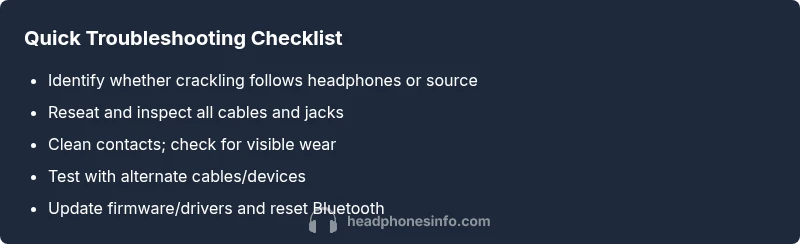
Reseat all connections and test
Unplug and reinsert all cables firmly. Try another device to verify whether the crackling follows the headphones or stays with the original source. This helps distinguish a source issue from a headphone problem.
Tip: Make sure outlets or adapters aren’t loose and that connectors click when fully inserted. - 2
Inspect for visible damage
Look for kinks, frays, or bent jacks on the cable and at the connector ends. A damaged cable is a common source of crackling and often easier to replace than repair.
Tip: Hold the connector close to the plug housing to detect hairline cracks that aren’t obvious at a distance. - 3
Clean contacts and connectors
Dust and oxidation can cause intermittent contact. Use a dry microfiber cloth to wipe the jack and plug ends; if needed, a small amount of isopropyl alcohol on a swab can be used sparingly.
Tip: Never spray liquid directly into the jack; ensure components are fully dry before testing. - 4
Try a different cable or dongle
Swap in a known-good cable or USB-C dongle. If crackling stops with a new cable, the original one was the issue. If it persists, the problem is likely elsewhere.
Tip: Label tested cables to avoid confusion during future troubleshooting. - 5
Update firmware/drivers and reset Bluetooth
For wireless headphones, visit the manufacturer’s site to check firmware updates. Update drivers for wired setups as needed and re-pair Bluetooth devices to clear stale connections.
Tip: Back up your settings if the headphones support profiles before updating. - 6
Test across multiple sources
Connect to a different phone, laptop, or audio source. If crackling occurs on all sources, the headphones are the likely culprit; if it’s source-specific, focus on the device’s output settings.
Tip: Document which sources were clean to help identify the root cause.
Diagnosis: Crackling sound in headphones
Possible Causes
- highLoose or dirty connection
- highDamaged or frayed cable
- mediumInterference (Bluetooth/wireless)
- lowDriver or firmware issue
Fixes
- easyReseat and inspect all connections (jack, USB-C, dongle)
- easyClean jacks and ports with a dry brush or compressed air
- easyTest with an alternate cable or dongle and another device
- easyUpdate drivers/firmware and reset Bluetooth pairing
- mediumIf unresolved, seek professional inspection or replace faulty hardware
People Also Ask
What is the first thing I should check when headphones crackle?
Start with the simplest checks: reseat all cables, inspect the jack for dirt, and test with another device to see if the crackling follows the headphones or the source.
First, reseat cables and test with another device to see if the crackling follows the headphones or the source.
Can Bluetooth interference cause crackling even with good headphones?
Yes, Bluetooth interference from other devices or routers can cause crackling. Try changing the transmitter, moving closer to the source, or switching to a wired connection to confirm.
Bluetooth interference can cause crackling. Try another transmitter or a wired setup to verify.
Should I replace my headphones if crackling persists after fixes?
If crackling persists after all reasonable fixes, consider replacing the headphones or requesting a warranty inspection from the manufacturer.
If the crackling stays after fixes, replacement or warranty service may be the best option.
Is moisture a common cause of crackling?
Moisture or sweat can cause corrosion and crackling. Dry the connectors thoroughly and store headphones in a dry place.
Moisture can cause crackling; dry the connectors and store in a dry place.
Do cheap cables cause more crackling than quality ones?
Yes, lower-quality cables may have poorer shielding and weaker contacts, increasing the chance of crackling.
Lower-quality cables can contribute to crackling due to weaker shielding and contacts.
Watch Video
What to Remember
- Diagnose the source of crackling before replacing gear
- Start with cables, connections, and cleaning first
- Test across multiple devices to isolate the issue
- If unresolved, professional service or replacement may be necessary