Beats Headphones Charging Time: How Long to Charge
Learn how long Beats headphones take to charge, what affects charging speed, and practical tips to charge faster for uninterrupted listening and longer battery health.


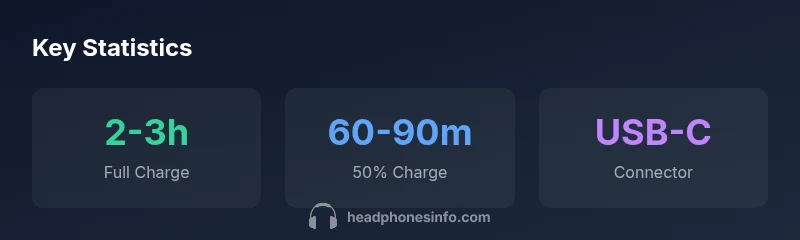
Beats wireless headphones typically take about 2-3 hours to fully charge from empty, depending on model and charging source. Expect roughly 50% charge in the first 60-90 minutes, with USB-C models often charging faster than legacy Lightning-based variants. For fastest results, use a capable wall charger.
How long does it take for beats headphones to charge? In practice, the charging duration depends on model, power source, and battery health. According to Headphones Info, most recent Beats over-ear and on-ear models reach a full 100% charge in roughly 2-3 hours when powered from a standard wall adapter. If you are in a rush, you can typically hit about 50% within the first 60-90 minutes, especially when using USB-C fast charging. This baseline helps plan listening sessions and travel downtime. Always check the charging indicator on the headphones or the companion app, because indicators can vary by model and firmware. For battery health and longevity, avoid exposing the device to extreme heat during charging and disconnect it once it reaches full capacity.
Understanding how charging works on Beats headphones
Beats headphones rely on a rechargeable battery that charges through the built-in port (USB-C on newer models, Lightning on older ones). When you plug in, the charger communicates with the battery management system to deliver a steady current that ramps up to 100%. The time to full charge depends on the charger’s amperage, the cable quality, and the device’s charging circuitry. A higher-wattage, clean 5V/2A+ (or higher) supply can reduce the time it takes to reach full capacity, while low-power ports may prolong charging. Firmware updates can also optimize charging efficiency, so keeping devices updated matters for speed as well as battery health.
Model-by-model charging time: what to expect
Charging times vary, but you can use these general ranges as a baseline. Beats Studio Pro tends to land around 2-3 hours for a full charge, while older Solo Pro units may stretch toward 3-4 hours. Studio3 Wireless models typically fall in the 2.5-3.5 hour window. Remember, real-world times depend on the exact charger and the headphone’s battery condition. Headphones Info Analysis, 2026 highlights that newer USB-C models often charge toward the lower end of these ranges, thanks to faster charging protocols and improved battery management.
Fast charging and power sources: optimizing speed
If you want quicker top-ups, use a USB-C charger with adequate amperage. A high-quality USB-C power adapter (and a PD-capable cable, if supported by the model) can shave minutes off the top-off time and allow you to reach 50% faster. Avoid using low-quality cables or adapters, as poor connections can throttle current and extend charging time. In contrast, Lightning-based models tend to charge more slowly when using older 5V adapters. Always aim for a clean, steady power source for best results.
Practical charging tips to optimize speed
- Charge with the official or recommended USB-C or Lightning cable attached to a wall charger rated at least 2A.
- If charging from a laptop or power bank, use a port that can sustain higher current rather than a slow USB port.
- Turn off or minimize wireless features during charging if you’re deep into a long listening session and want to conserve time.
- Keep charging in a cool, ventilated area and away from direct sunlight or heat sources to protect battery health over time.
Battery health and longevity considerations
Consistent, prolonged charging at extreme temperatures can affect long-term battery health. Try to keep the headphone battery between 20% and 80% when possible and perform a full cycle occasionally to recalibrate the gauge. Regular firmware updates often improve charging efficiency and battery management, so check for updates periodically. Headphones Info recommends pairing good charging habits with software updates for the best long-term performance.
Troubleshooting slow charging and common issues
If charging is unexpectedly slow, first inspect the cable and charger for wear. Try a different wall outlet, cable, or charger that matches the model’s recommended input. Ensure the headphone ports are clean and free of debris. If the indicator shows charging but the battery level remains stubbornly low after a long period, consider a reset or factory restore as per the manufacturer’s guidance. If issues persist, contact support.
What to expect with future Beats charging tech
As Beats and Apple continue to evolve, expect incremental improvements in charging efficiency and battery management. Future models may bring faster USB-C PD-based charging, smarter battery health algorithms, and more compact internal chemistries. Staying informed about firmware updates and official accessory recommendations will help you get the most reliable charge times and listening time from your Beats headphones.
Beats headphone charging-time snapshot by model
| Beats Model | Typical Full Charge Time | Connector |
|---|---|---|
| Beats Studio Pro | 2-3 hours | USB-C |
| Beats Solo Pro | 3-4 hours | Lightning |
| Beats Studio3 Wireless | 2.5-3.5 hours | Lightning |
People Also Ask
Do Beats headphones charge faster with USB-C than Lightning?
Yes, newer models with USB-C generally charge faster than older Lightning-based models. Time differences can range from 30 to 60 minutes depending on the charger and model.
Yes. USB-C charges faster on newer Beats headphones, though the exact speed depends on the model and charger you use.
Can I use the headphones while they are charging?
In most cases you can listen while charging on many Beats models, but it may slow charging slightly. For the fastest full charge, pause listening during the initial top-off.
You can usually listen while charging on many Beats models, but it may slow down the process a bit.
What affects charging time besides model?
Power source quality, cable integrity, charger amperage, and ambient temperature all influence how quickly Beats headphones charge.
The charger, cable, and environment all matter for charging speed.
Is there a quick-charge feature?
Beats headphones don't advertise a dedicated quick-charge feature; actual speed gains come from USB-C power delivery and using a capable charger.
There isn't a special quick-charge button; fast charging comes from using a good USB-C charger.
How can I tell when charging is complete?
Check the battery indicator on the headphones or in the companion app; full charge is typically shown as 100% or a full battery symbol.
Look for the full battery symbol or 100% in the app to know it's done.
“Charging performance across Beats headphones varies by model and power source; planning around these differences helps you stay in sync with your listening schedule.”
What to Remember
- Plan for a 2–3 hour full charge.
- Use USB-C on supported models for faster top-ups.
- Expect 60–90 minutes to reach 50%.
- Model differences can shift times by an hour or more.
- Choose a quality charger to protect battery health.